For architectural visualization, 3ds Max is the industry-standard choice for studio pipelines, while Blender is the strongest free option for individuals and small teams. 3ds Max wins on CAD import, Revit interoperability, and a mature V-Ray and Corona ecosystem; Blender wins on price (it is free), a fast modern viewport, and Geometry Nodes. In our studio we run both — the right tool depends on the stage of the project, not on which program is "better."
3ds Max vs Blender for archviz: the short answer3ds Max vs Blender for archviz: the short answer
Choose 3ds Max if you work in a professional archviz pipeline that ingests AutoCAD or Revit files, relies on V-Ray or Corona, and needs to trade scene files with clients and freelancers who already use it. Choose Blender if you are learning, working solo, or building a low-cost pipeline, and you want a free tool with a fast viewport and a huge community. Both produce photoreal architectural renders; the difference is workflow, interoperability, and cost — not final image quality.

3ds Max vs Blender at a glance: key differences
The two tools overlap on modeling, texturing, lighting, and rendering, but they diverge on the things that matter most in an architectural workflow: how cleanly CAD geometry comes in, which render engines are available, and what it costs to run per seat. This table summarizes where each one leads.
| Factor | 3ds Max | Blender |
| Price | Subscription, ~$1,875/year (list) | Free, open-source (GPL) |
| Platform | Windows only | Windows, macOS, Linux |
| CAD / Revit import | Native DWG, FBX, Revit interoperability | Add-ons required (DXF, IFC via BlenderBIM) |
| Modeling | Modifier stack, spline tools, mature poly modeling | Modifiers + Geometry Nodes, fast direct modeling |
| Render engines | V-Ray, Corona, Arnold, FStorm | Cycles, Eevee (V-Ray add-on available) |
| Archviz asset ecosystem | Very large (models, materials, scripts) | Growing (BlenderKit, Poly Haven) |
| Learning curve | Steeper, but structured for archviz | Approachable, huge free tutorial base |
| Best for | Studios and client pipelines | Individuals, small teams, low-budget setups |
Modeling and CAD import: where 3ds Max still leads
Architectural projects rarely start from a blank scene — they start from a drawing. 3ds Max reads AutoCAD DWG and DXF files natively and links cleanly to Revit through Autodesk's interoperability tools, so plans, sections, and BIM geometry arrive with layers and units intact. Its modifier stack (Edit Poly, Shell, Sweep, Symmetry) is non-destructive and predictable, which is why studios trust it for precise, spec-accurate building geometry.
Blender models beautifully and its viewport is fast, but CAD is its weak point: DWG import needs third-party add-ons, and BIM comes in through the community BlenderBIM/IFC add-on rather than a first-party pipeline. Blender's Geometry Nodes are genuinely powerful for procedural facades, railings, and parametric detailing — arguably ahead of anything in stock 3ds Max — but you assemble that capability yourself instead of getting it out of the box.
- 3ds Max advantage: native DWG/DXF, Revit interoperability, modifier stack, spline-based architectural modeling.
- Blender advantage: Geometry Nodes for procedural detail, faster direct modeling, no import license friction between machines.
- Practical takeaway: if your input is Revit or AutoCAD every week, 3ds Max saves hours; if you model from scratch or from sketches, the gap nearly disappears.

Rendering: V-Ray and Corona vs Cycles and Eevee
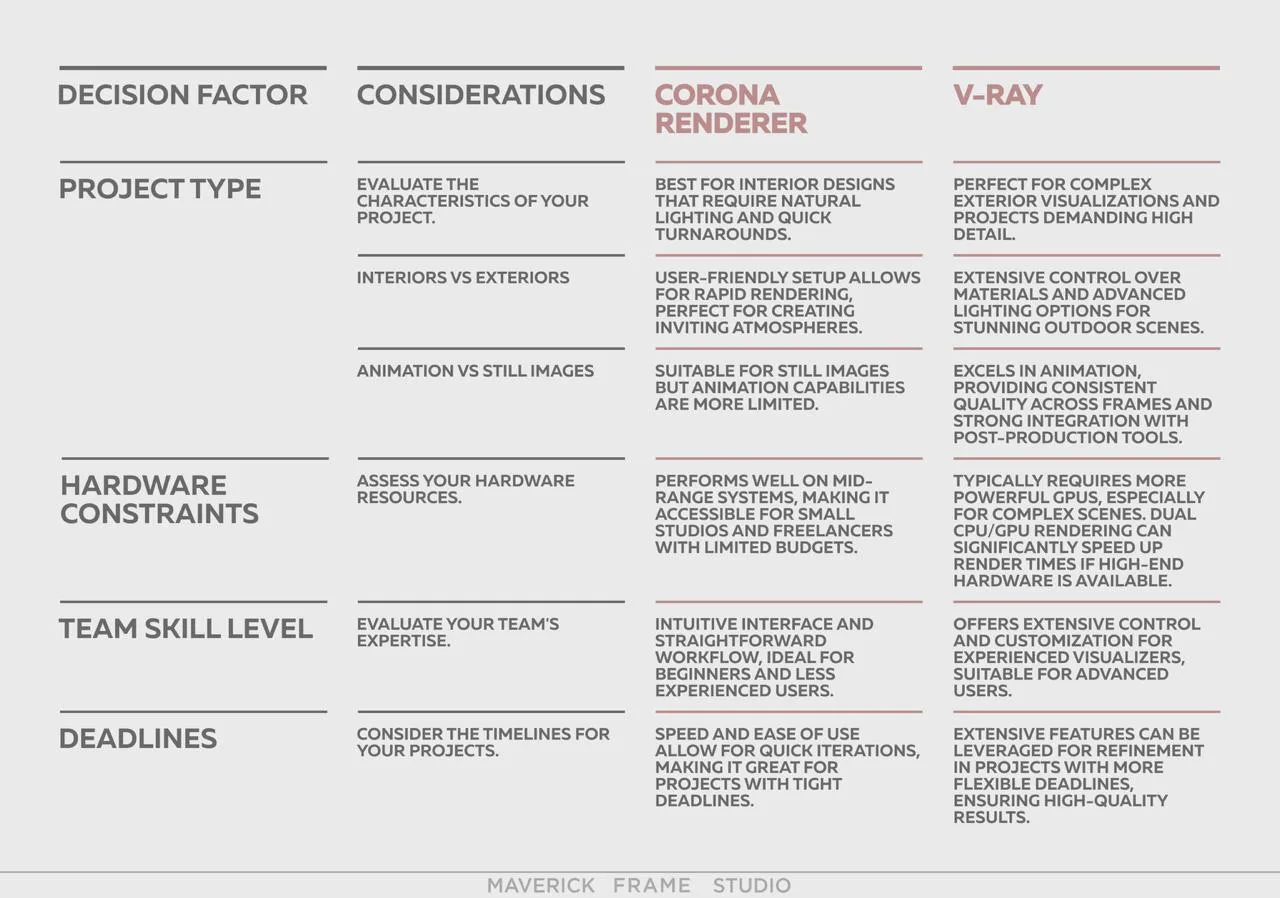
Render engine choice is where many archviz decisions are actually made. 3ds Max plugs into the engines that dominate professional architectural rendering — V-Ray and Corona — plus Arnold and FStorm, giving you the exact toolset most clients and outsourcing partners expect. Corona in particular is prized in archviz for its simple, forgiving lighting workflow, and it is only available for 3ds Max and Cinema 4D.
Blender ships with two capable engines for free: Cycles, a physically based path tracer for photoreal stills and animation, and Eevee, a real-time rasterizer for fast previews and walkthroughs. V-Ray now has an official Blender version too, narrowing the gap. For pure final-image quality, a skilled artist reaches photoreal results in either ecosystem — Cycles and V-Ray both resolve glass, foliage, and soft daylight convincingly. The real difference is which engine your team, assets, and clients are standardized on. If you are weighing the two dominant 3ds Max engines specifically, our Corona vs V-Ray comparison breaks down that choice in detail.
Cost: 3ds Max subscription vs free Blender
Blender is free and 3ds Max is a paid Autodesk subscription — around $1,875 per year, or roughly $235 per month at list price. That is the single clearest difference between them. Blender is released under the GPL, so there is no seat cost, no license server, and no per-machine friction. (Autodesk adjusts its pricing periodically and offers monthly, annual, and multi-year terms, so verify current rates on Autodesk's site before budgeting.)
But software license is only part of a studio's real cost. Render engines are usually a separate subscription (V-Ray and Corona are paid; Cycles and Eevee are free), and the biggest line item is artist time. A tool that shaves hours off CAD cleanup, asset reuse, or client revisions can easily outweigh its license fee. For a full breakdown of what production rendering actually costs, see our 3D rendering pricing guide.
- Blender total: $0 for the software and its two render engines.
- 3ds Max total: ~$1,875/year software + a render engine subscription (e.g. V-Ray or Corona) on top.
- The catch: for a busy studio, license cost is small next to labor — which is why paid pipelines persist despite a free alternative.
Learning curve: which is easier to start with?
Blender is generally easier and cheaper to start with — it is free to download, and its tutorial ecosystem is enormous, so a beginner can be producing simple renders within days. Its interface was redesigned to be more approachable and the barrier to entry is essentially zero.
3ds Max has a steeper initial curve, but its structure maps neatly onto architectural work, and once learned it rewards precision and repetition. Most professional archviz training, studios, and job listings still assume 3ds Max fluency, so time invested there tends to transfer directly to paid work. For a hobbyist or student, Blender is the softer landing; for someone targeting a studio job, 3ds Max is the more directly employable skill today.
Why most architectural visualization studios still use 3ds MaxWhy most architectural visualization studios still use 3ds Max
If Blender is free and technically capable, why do professional archviz studios still standardize on 3ds Max? The honest answer is not raw capability — it is the ecosystem. Two decades of archviz assets, materials, scripts, and studio pipelines are built around 3ds Max, and it sits inside the Autodesk stack (AutoCAD, Revit) that architects already use. Switching a working studio means re-buying that ecosystem in time: rebuilding material libraries, retraining muscle memory, and re-validating every export path.
In our studio, the reason we keep 3ds Max central is interoperability and asset gravity, not that it renders better than Blender. When a client sends a Revit model at 6 p.m. and needs hero images by morning, the tool that ingests that geometry cleanly and connects to a mature Corona or V-Ray library wins the night. That is a workflow argument, and it is exactly the part of the comparison that tool-versus-tool videos tend to skip.
It is also why the common search "why don't architects use Blender?" has a nuanced answer: architects themselves mostly work in BIM tools like Revit for the actual building, and the visualization layer downstream has simply standardized on 3ds Max. Blender's absence from many studios is about inertia and interoperability, not a quality ceiling.
When Blender is the better choice for archviz
Blender is the smarter pick in several real scenarios, and its share of architectural work is rising. It is the better choice when budget is the binding constraint, when you are a solo artist or a small team without an Autodesk stack, or when you want cross-platform freedom on macOS or Linux — which 3ds Max does not support at all.
- Zero budget: freelancers and students who cannot justify a subscription.
- Mac or Linux: 3ds Max is Windows-only; Blender runs everywhere.
- Procedural detail: Geometry Nodes for parametric facades, fences, and scattering.
- Full ownership: no license server, no per-seat cost as a team scales.
- Green-field pipelines: new studios with no legacy 3ds Max asset library to protect.
3ds Max vs Blender vs Maya: where Maya fits
Searchers often line these three up together, so it is worth placing Maya. Maya (also Autodesk) is the standard for character animation, film, and VFX — not architecture. For archviz specifically, Maya's strengths in rigging and complex animation are rarely needed, and it lacks the architectural modeling conveniences of 3ds Max. The practical hierarchy for architectural visualization is 3ds Max first, Blender as the free and increasingly strong alternative, and Maya only if your studio also does heavy animation or entertainment work.
Which should you choose?Which should you choose?
Match the tool to your situation rather than chasing a universal winner. If you are building or joining a professional archviz pipeline with CAD/Revit input and client expectations around V-Ray or Corona, 3ds Max is the safe, employable choice. If you are learning, working solo, watching cost, or on Mac/Linux, Blender gives you a genuinely professional result for free. Many artists — including us — end up fluent in both, using 3ds Max for interoperability-heavy client work and Blender for procedural modeling, quick studies, and budget-sensitive jobs. Whichever you pick, the final image is decided by the artist, not the logo on the splash screen. If you would rather skip the tooling decision entirely, our architectural 3D modeling services deliver production-ready geometry and renders regardless of the software behind them.