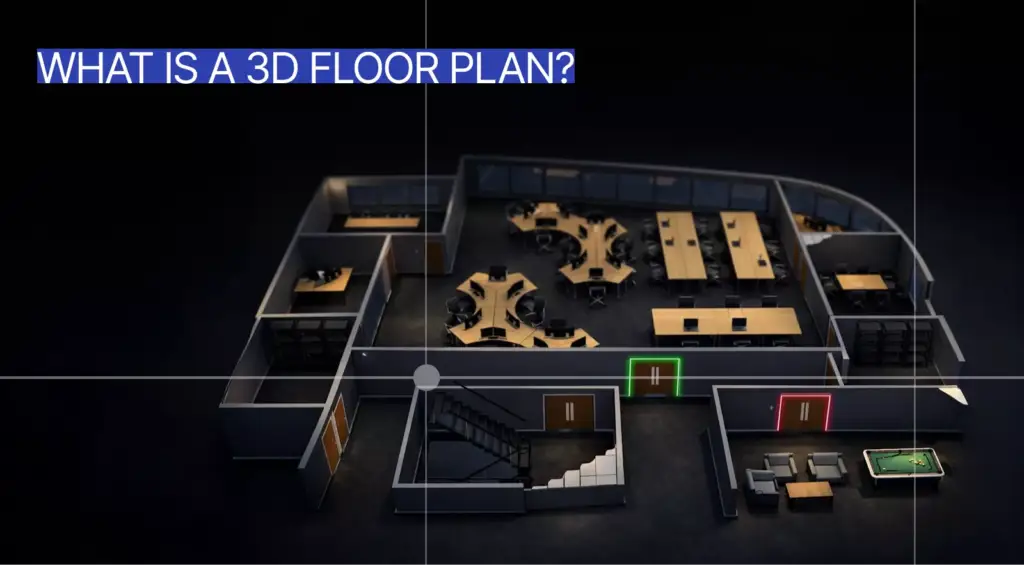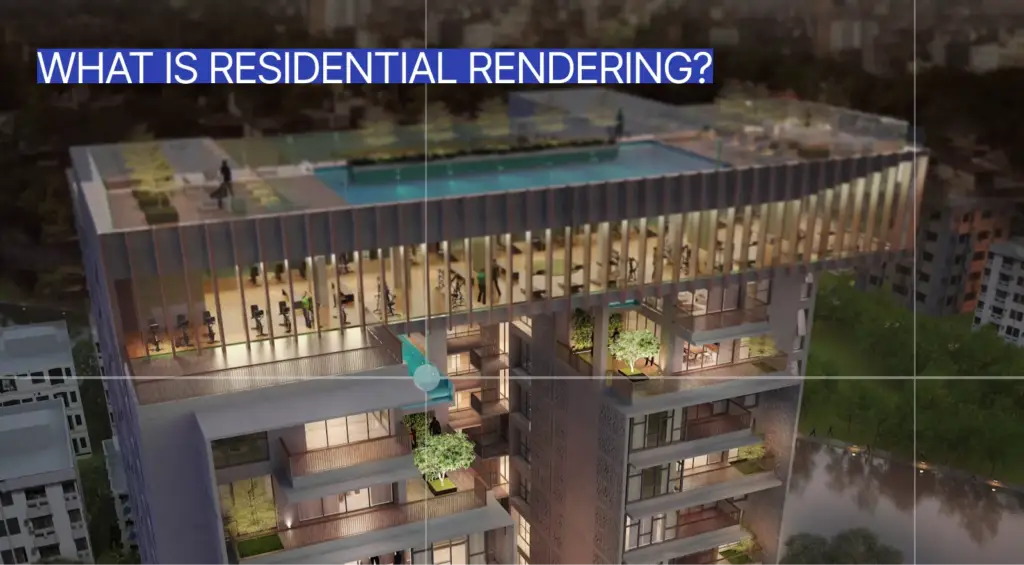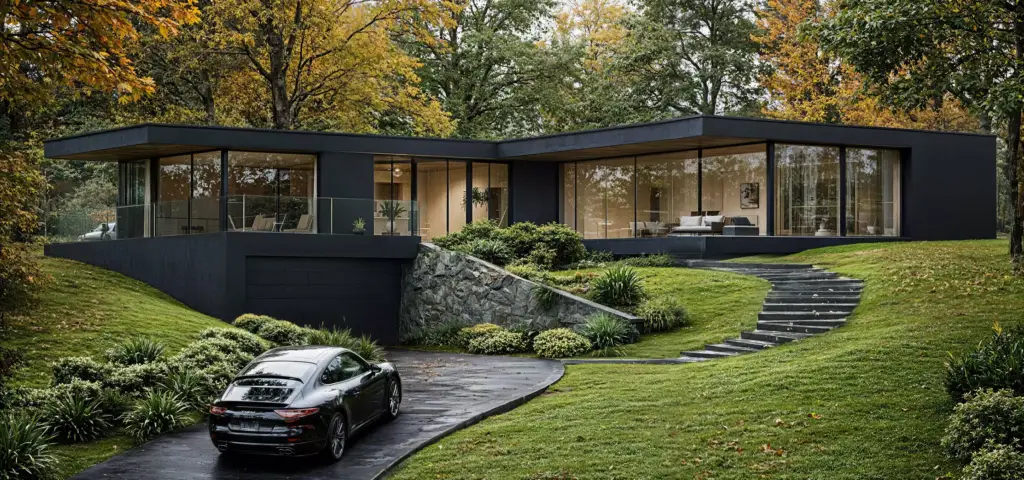
Commercial rendering is the process of creating realistic digital images, animations, or interactive visuals of commercial buildings and spaces before they are built, renovated, leased, approved, or marketed. It is used to visualize offices, retail stores, hotels, restaurants, mixed-use developments, shopping centers, lobbies, industrial facilities, and other business-focused properties so architects, developers, investors, tenants, and marketing teams can understand the design clearly. Commercial rendering is part of architectural visualization and 3D rendering, and it can include exterior views, interior views, aerials, virtual tours, animations, leasing visuals, investor presentations, and marketing campaign assets. Commercial projects often need both angles, which is why our guide to exterior vs interior rendering is a useful companion.
What commercial rendering is: a computer-generated (CGI) visualization of a commercial building or space, built from a 3D model before or independent of construction.
- Not cement or plaster rendering. In construction, “rendering” means applying a mortar or acrylic coat to a wall — a physical finish, not a digital image.
- Not residential rendering. Commercial renders are judged on leasing, footfall, and investor ROI; residential renders sell lifestyle and how a home feels to live in.
- Not real estate photography. A render is built from a 3D model of a space that may not exist yet; a photo can only capture what is already built.
Commercial Rendering Meaning
Commercial rendering is a digital visualization of a commercial property, building, or business space. It is one of the core types of architectural rendering. It shows how offices, retail stores, hotels, restaurants, mixed-use developments, lobbies, or industrial facilities will look before they are completed, renovated, leased, or marketed. Its purpose goes beyond visual appeal: it supports approvals, leasing, funding, tenant attraction, and marketing. Forward-looking commercial spaces are increasingly explored through metaverse interior design.
The word “commercial” refers to spaces used for business, hospitality, retail, work, leasing, public access, or revenue generation. A commercial render can show an exterior facade, office floor, hotel lobby, restaurant interior, shopping center, storefront, aerial masterplan, or tenant fit-out option. For projects that need polished visuals across these property types, commercial 3D rendering services help turn design information into presentation-ready images and animations.
Commercial architectural rendering is often used when technical drawings are too abstract for non-technical stakeholders. A leasing team, investor, tenant, or public authority may understand a photorealistic visual faster than a floor plan or elevation. This makes commercial rendering useful across both design decisions and market-facing communication.
What a Commercial Render Shows
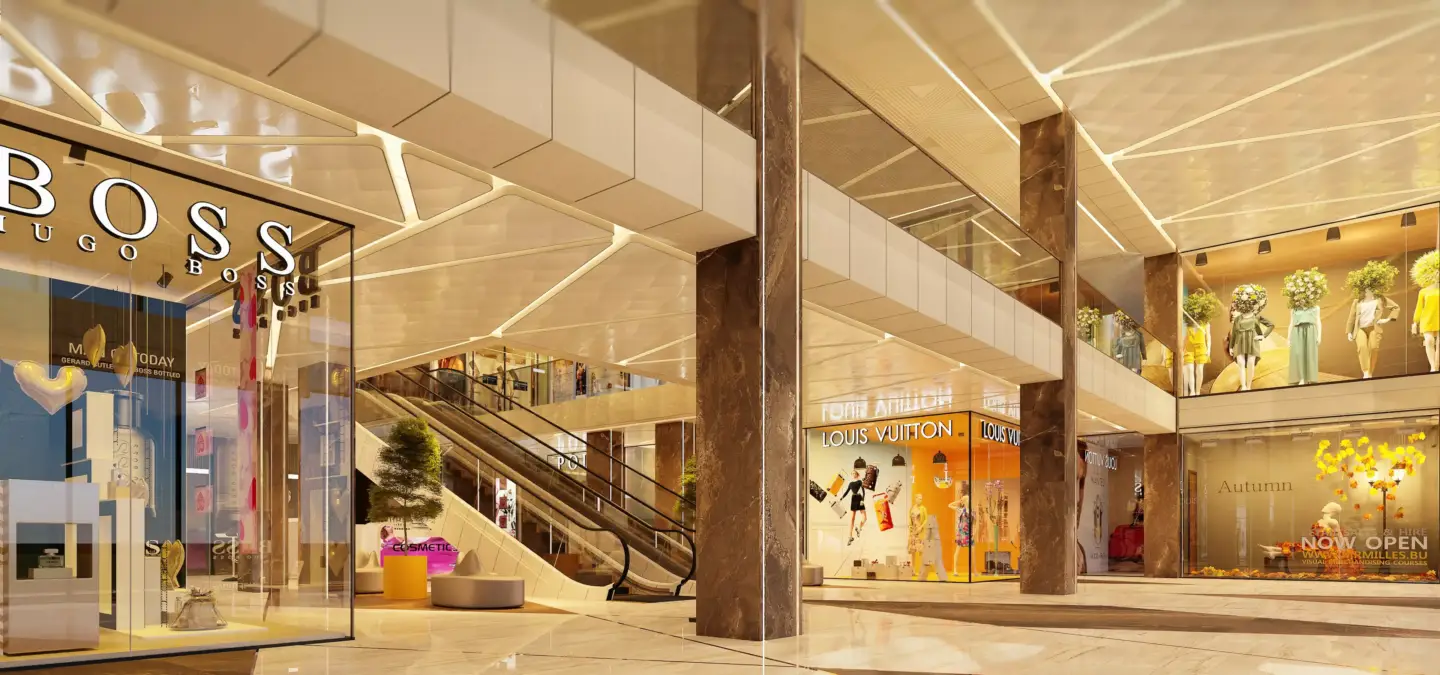
A commercial render shows the design, layout, materials, lighting, scale, branding, and atmosphere of a business-focused space. It may show the outside of a commercial building, the inside of a retail or office environment, or a complete development with roads, landscaping, signage, and surrounding context. A strong commercial render helps viewers understand how the space will work, not only how it will look.
- Building exterior, facade, entrances, and surrounding context.
- Interior layouts, furniture, fixtures, lighting, and circulation.
- Brand elements such as signage, colors, customer touchpoints, and merchandising.
- Commercial zones such as reception areas, lobbies, offices, stores, restaurants, amenities, and shared spaces.
- Human scale with people, cars, furniture, displays, or operational details.
- Materials such as glass, metal, concrete, wood, stone, tile, fabric, and lighting finishes.
- Day, dusk, night, or seasonal atmosphere.
- Real estate marketing elements such as aerial views, street presence, and amenity views.
The best commercial render connects architecture with real business use. A retail render should show the storefront, display logic, and customer path, while an office render should clarify workflow, meeting areas, and workplace atmosphere. For commercial properties where indoor experience is central, 3D interior rendering services can support leasing, design approval, hospitality presentation, and branded environment planning.
Why Business Context Matters in Commercial Rendering
Business context matters because commercial rendering must show how a space works for customers, tenants, employees, visitors, or investors. A strong commercial render communicates function, brand experience, traffic flow, visibility, atmosphere, and commercial value. Without that context, a visual may look attractive but fail to explain why the property or space is viable.
A retail render should show customer journey, display zones, signage, and brand presence. An office render should show workflow, collaboration areas, circulation, and workplace mood. A hospitality render should show comfort, service flow, guest experience, and the kind of atmosphere that supports the business concept.
Developers and leasing teams need a slightly different kind of clarity. They need visuals that support tenant attraction, investor confidence, approvals, and market positioning. That means a commercial render should be accurate enough for decision-making and persuasive enough for sales or leasing materials.
How Commercial Rendering WorksHow Commercial Rendering Works
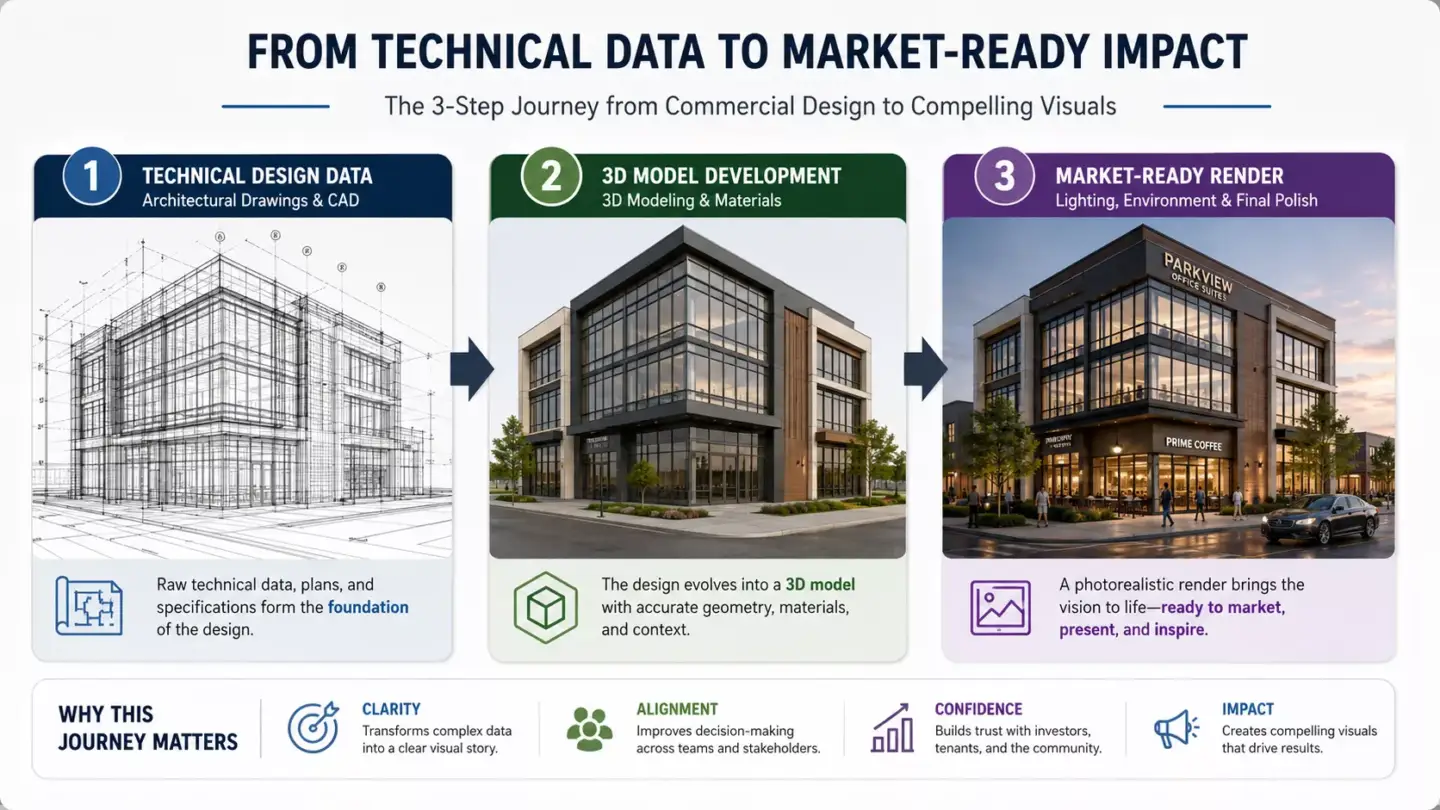
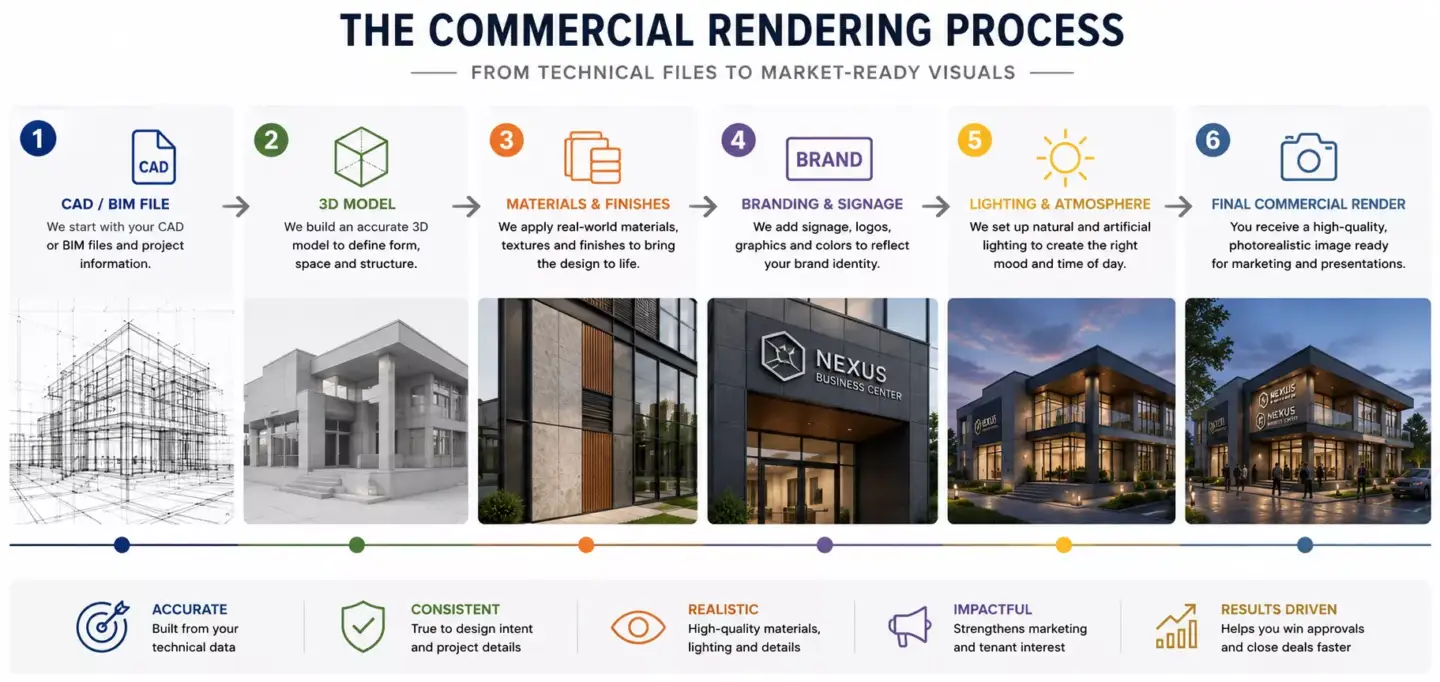
Commercial rendering works by turning architectural or design information into a 3D scene, then adding materials, lighting, furniture, branding, people, landscape, camera angles, and final rendering. The result is a polished visual asset that can support approvals, leasing, marketing, or investor presentations. The workflow can be simple for one office view or complex for a mixed-use development with interiors, exteriors, aerials, and animations.
- Collect project materials: CAD drawings, BIM files, floor plans, elevations, site plans, moodboards, and brand guidelines.
- Build or import the 3D model of the commercial space or building.
- Add architectural details, facade materials, furniture, fixtures, signage, and finishes.
- Create the surrounding environment, landscape, streetscape, or interior context.
- Set camera views such as storefront view, lobby view, aerial view, eye-level view, or tenant-facing view.
- Add lighting, shadows, weather, people, cars, and commercial activity where useful.
- Render still images, animations, panoramas, or interactive visuals.
- Refine the output through post-production, color correction, branding, and final detail adjustments.
The 3D model is the foundation of the final visual. If proportions, ceiling heights, storefront geometry, facade elements, or furniture scale are wrong, the render may look polished but mislead stakeholders. For projects that need accurate geometry before final images, architectural 3D modeling services can support renderings, walkthroughs, animations, and presentation workflows.
Materials Needed to Create a Commercial Render
To create an accurate commercial render, a 3D artist usually needs architectural drawings, CAD or BIM files, dimensions, material specifications, branding assets, furniture or fixture references, site context, and required camera views. The more complete the brief is, the fewer revisions the project usually needs. Clear inputs also help the visualization team avoid guessing important commercial details.
- Floor plans, elevations, sections, and site plans.
- CAD, BIM, Revit, SketchUp, or 3D model files if available.
- Dimensions, ceiling heights, and spatial requirements.
- Facade, interior material, and finish specifications.
- Furniture, fixtures, equipment, and signage references.
- Brand guidelines, logos, colors, and merchandising rules.
- Landscape, streetscape, or surrounding context references.
- Camera views, output formats, and usage channels.
Commercial projects often need more input than residential visuals because brand and operational logic matter. A restaurant render may need seating layout, lighting mood, service path, and finish details, while a retail render may need shelving, signage, merchandising rules, and customer flow. A good brief should separate fixed requirements from creative direction so the final image stays accurate and persuasive.
Common Uses for Commercial Rendering
Commercial rendering is used to present, approve, lease, sell, and market commercial properties before they are finished or photographed. It helps architects explain design concepts, developers secure buy-in, leasing teams attract tenants, and brands visualize business spaces before construction or fit-out. It is especially useful when drawings, spreadsheets, or empty shells cannot communicate the future value of a space.
- Architectural presentations for commercial clients.
- Real estate development marketing before construction.
- Leasing materials for offices, retail units, and mixed-use properties.
- Investor pitch decks and funding presentations.
- Tenant fit-out approvals and landlord presentations.
- Retail, restaurant, and hospitality concept visualization.
- Planning approvals and stakeholder communication.
- Website, brochure, billboard, and sales gallery visuals.
- Design validation for layout, signage, lighting, facade, and customer flow.
Commercial rendering also helps teams create consistent campaign assets. A single approved commercial model can support website visuals, social media, brochures, investor decks, leasing presentations, and sales gallery screens. For properties where outdoor space and site experience are important, landscape rendering services can add clarity around plazas, entrances, amenities, planting, access, and streetscape value.
Commercial Rendering for Real Estate Marketing and Leasing
In real estate marketing, commercial rendering helps promote a property before it is built, occupied, or ready for photography. It gives potential tenants, investors, and buyers a realistic impression of the building, amenities, location, interior potential, and business value. This can be critical for pre-leasing, funding discussions, development presentations, and early sales campaigns.
Commercial renders can show lobby experience, tenant-ready office layouts, retail fit-out options, parking, amenities, and street presence. They can also help leasing teams present the same property to different tenant categories without physically rebuilding or staging the space. For property marketing teams, 3D rendering for real estate can connect commercial visuals with pre-sales, leasing, investor communication, and project presentation.
Leasing visuals should be persuasive without becoming misleading. The render should show realistic proportions, accurate access points, practical circulation, and plausible fit-out options. When a commercial image creates confidence and still matches the project’s real constraints, it becomes a stronger sales and approval tool.
Examples of Commercial RenderingExamples of Commercial Rendering
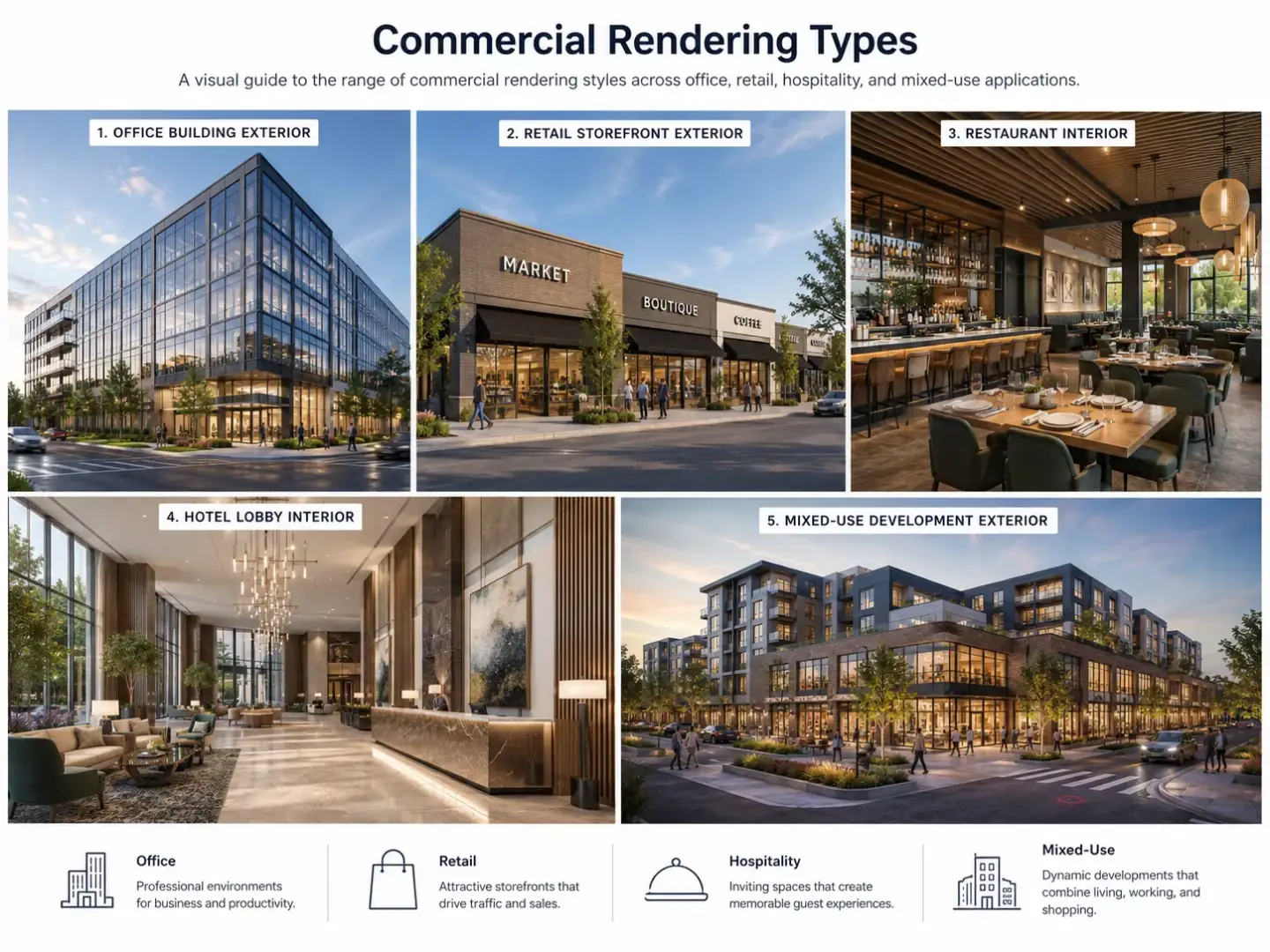
Examples of commercial rendering include a photorealistic office lobby, a retail storefront, a shopping center aerial view, a restaurant interior, a hotel lobby, a coworking space, a mixed-use development, a warehouse exterior, or a virtual tour of a commercial property. These examples can be still images, animations, 360 panoramas, virtual tours, or real-time interactive presentations. The right example depends on whether the project needs to communicate design, leasing potential, brand experience, or investment value.
- Office building exterior render.
- Office interior and workplace render.
- Retail storefront or shopping mall render.
- Restaurant, cafe, or hospitality interior render.
- Hotel lobby, suite, lounge, or amenity render.
- Mixed-use development aerial render.
- Industrial or logistics facility render.
- Commercial lobby, reception, or entrance render.
- Tenant fit-out and space planning render.
- Virtual staging for commercial leasing.
A hotel lobby render may focus on arrival experience, comfort, lighting, and premium atmosphere. A retail storefront render may focus on visibility, signage, merchandising, and customer entry. A mixed-use development render may focus on scale, access, public space, streetscape, and how different functions work together.
Types of Commercial Rendering
The three core types of commercial rendering are exterior renders (facade, entrance, and streetscape), interior renders (layout, materials, and atmosphere), and aerial renders (site context and masterplan). Commercial rendering also extends to retail, office, and hospitality renders plus virtual tours, animations, and 360 panoramas. Each type supports a different business goal, so the best format depends on whether the viewer needs to understand facade impact, tenant experience, brand atmosphere, site context, or spatial movement.
| Type | Best For | What It Shows |
| Commercial exterior render | Development marketing and approvals | Facade, entrances, streetscape, scale, and context |
| Commercial interior render | Leasing, design approval, and fit-out | Layout, furniture, lighting, materials, and atmosphere |
| Retail rendering | Store design and brand presentation | Shopfront, displays, signage, and customer flow |
| Office rendering | Workplace design and leasing | Desks, meeting rooms, lounges, and collaboration zones |
| Hospitality rendering | Hotels, restaurants, and lounges | Guest experience, mood, comfort, and service areas |
| Aerial commercial render | Large sites and mixed-use projects | Masterplan, parking, roads, landscape, and surroundings |
| Commercial animation | Stronger storytelling | Movement through or around the property |
| 360 or virtual tour | Immersive leasing and presentations | Interactive view of commercial interiors or exteriors |
Still renders are often enough for brochures, landing pages, approvals, and investor slides. Animations are stronger when the viewer needs to move through a lobby, approach a storefront, understand a site, or experience a hotel environment. When immersive exploration matters, 360 panorama services can help teams present commercial interiors and exteriors in a more interactive format.
Commercial Rendering Compared With Residential RenderingCommercial Rendering Compared With Residential Rendering
Commercial rendering visualizes business-focused spaces such as offices, stores, hotels, restaurants, industrial facilities, and mixed-use developments. Residential rendering visualizes homes, apartments, villas, and living spaces. Commercial rendering usually puts more emphasis on customer flow, leasing value, brand experience, compliance, scale, amenities, and business use.
| Factor | Commercial Rendering | Residential Rendering |
| Main focus | Business, leasing, customer, or tenant experience | Living experience and personal comfort |
| Common spaces | Offices, retail, hotels, restaurants, mixed-use, industrial | Houses, apartments, villas, residential interiors |
| Key audience | Developers, tenants, investors, brands, leasing teams | Homeowners, buyers, designers, residential developers |
| Visual priorities | Brand, signage, traffic flow, scale, amenities, ROI | Comfort, lifestyle, finishes, and room mood |
| Common outputs | Leasing visuals, investor decks, storefront renders, office renders | Home exterior renders, living room renders, renovation previews |
| Main decision goal | Approve, lease, fund, sell, or market a commercial asset | Approve, sell, renovate, or personalize a home |
A residential render may focus on comfort, lifestyle, finishes, and family use. A commercial render must also show how the space supports a business goal, such as tenant attraction, sales conversion, service flow, foot traffic, or workplace performance. This makes commercial visualization more dependent on brand positioning and operational logic.
Commercial Rendering Compared With Interior and Exterior RenderingWe judge a commercial render by one question — does it help the space make money? A home render is about whether it feels good to live in. The moment a client treats a commercial render like a residential one, it stops doing its job — it can even work against the project.
From our studio — Dim Kuzmenko, Company Owner
Commercial Rendering Compared With Interior and Exterior Rendering
Commercial rendering can include both interior and exterior rendering. The difference is that commercial describes the business use of the property, while interior and exterior describe the viewpoint or part of the space being visualized. A commercial render can be a hotel lobby interior, a shopping center facade, an office aerial, or a virtual tour of a mixed-use project.
| Term | Meaning | Example |
| Commercial rendering | Rendering for business or revenue-generating spaces | Office tower, retail unit, hotel, restaurant |
| Interior rendering | Rendering of indoor spaces | Hotel lobby, office floor, retail interior |
| Exterior rendering | Rendering of a building’s outside | Commercial facade, shopping center entrance |
| Architectural visualization | Broader field of visualizing architecture | Renders, animations, VR, walkthroughs |
| 3D modeling | Creating the digital geometry | Building model, furniture, facade elements |
| Real estate photography | Capturing an existing finished property | Photos of a completed office or store |
A retail interior render and an office exterior render can both be commercial renders. The commercial label tells you the project belongs to a business, leasing, hospitality, retail, or development context. The interior or exterior label tells you what part of the project the camera is showing.
For projects where facade, access, streetscape, and exterior brand presence matter, 3D exterior rendering services can complement commercial interior visuals. This is useful for shopping centers, office towers, hotels, restaurants, logistics sites, and mixed-use developments. Exterior visuals help viewers understand curb appeal, site arrival, and public-facing impact.
Commercial Rendering Compared With Real Estate PhotographyCommercial Rendering Compared With Real Estate Photography
Commercial rendering visualizes a property before it exists or before it is ready to photograph, while real estate photography captures an existing space. Rendering is better for pre-construction marketing, design approval, leasing concepts, and fit-out options. Photography is better when the finished property is available and real-world proof matters most.
| Factor | Commercial Rendering | Real Estate Photography |
| Best for | Unbuilt, unfinished, or redesigned spaces | Completed spaces |
| Control | High control over materials, lighting, furniture, and atmosphere | Limited to real conditions |
| Flexibility | Can show design options and future concepts | Shows current reality |
| Use cases | Pre-leasing, investor decks, approvals, and fit-out concepts | Listings, property documentation, and finished marketing |
| Limitation | Must be accurate to avoid unrealistic expectations | Cannot show what does not exist yet |
| Best result | Future-focused visual communication | Authentic proof of completed property |
Commercial rendering is especially useful when a space is still an empty shell, construction site, plan, or design concept. It can show a future lobby, retail fit-out, coworking space, hotel suite, or restaurant interior before it can be photographed. Photography becomes stronger after completion because it shows the real condition, actual materials, and finished operational environment.
What Makes a Good Commercial RenderWhat Makes a Good Commercial Render
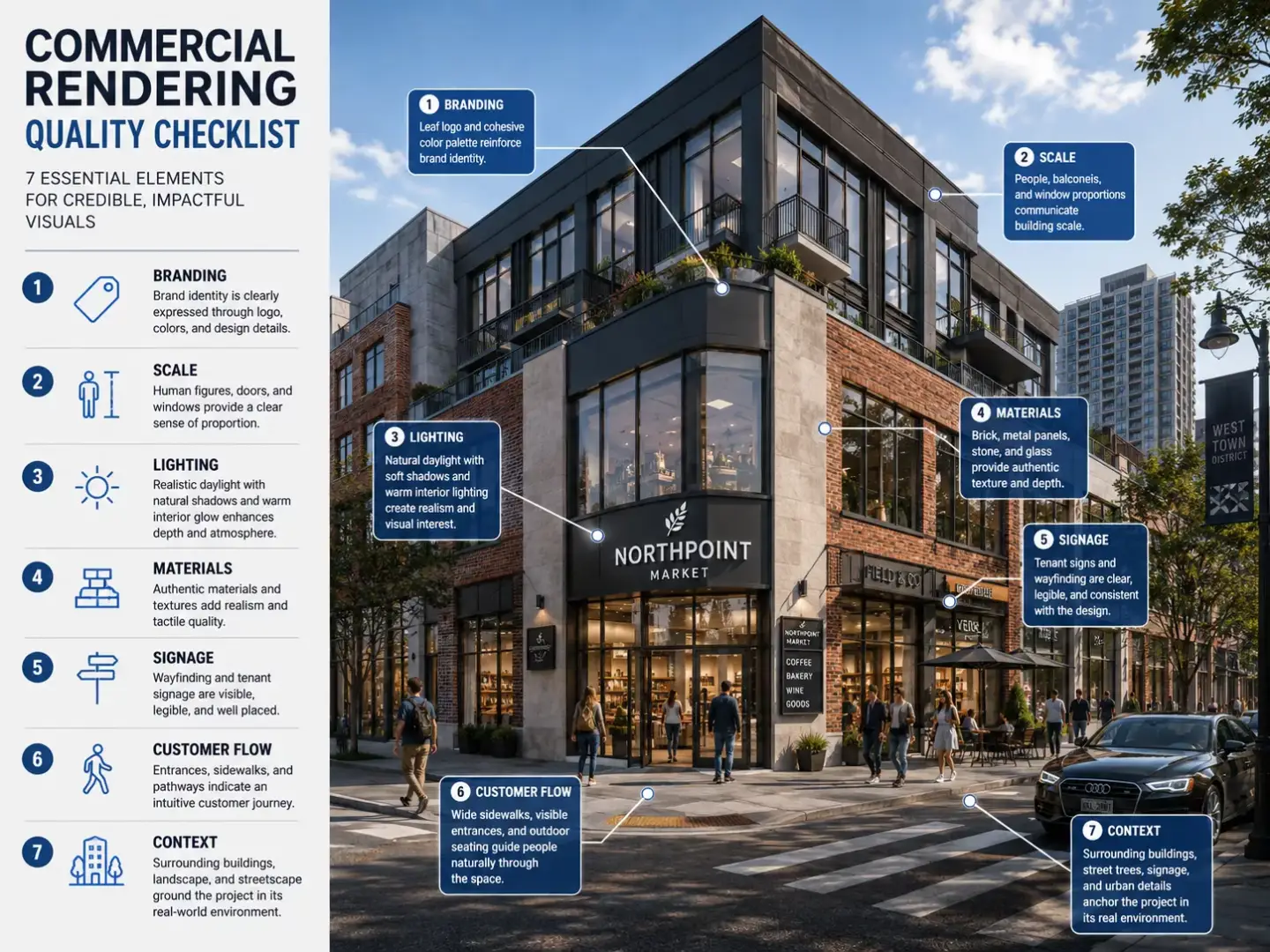
A good commercial render is realistic, accurate, and business-relevant. It should show the design clearly, reflect the brand or property positioning, communicate scale and flow, and help viewers understand why the commercial space is useful, attractive, and viable. The best visual does more than look premium: it also supports a leasing, approval, investment, or marketing decision.
- Accurate dimensions, proportions, and architectural details.
- Clear business purpose: leasing, marketing, approval, investor pitch, or design review.
- Realistic materials, lighting, and shadows.
- Appropriate branding, signage, and visual identity.
- Believable people, furniture, fixtures, and activity.
- Strong camera composition that supports the sales or presentation goal.
- Clear circulation, entrances, customer journey, or tenant experience.
- Proper site context, streetscape, landscape, or neighboring environment.
- Consistency between render, drawings, specifications, and brand expectations.
A strong commercial render should make the business logic visible. A lobby should communicate arrival quality, a store should show merchandising and circulation, and an office should show how teams use the space. If the render only looks decorative, it may fail as a commercial decision tool.
Common Commercial Rendering Mistakes
Common commercial rendering mistakes include generic styling, unrealistic lighting, missing brand context, wrong scale, weak composition, inaccurate materials, and visuals that look impressive but do not support the commercial goal. These problems can reduce trust and make the space harder to evaluate. A commercial render should clarify value, not use atmosphere to hide design or leasing issues.
- Treating an office, retail store, or hotel like a generic room.
- Adding decorative people or cars that do not match the target audience.
- Ignoring signage, customer flow, or tenant use.
- Over-polishing visuals until they no longer match the actual design.
- Using camera angles that hide important commercial details.
- Forgetting context such as parking, access, streetscape, or neighboring properties.
- Showing beautiful spaces without communicating business value.
The most common mistake is making the render visually dramatic but commercially vague. If viewers cannot understand who the space serves, how people move through it, or why it is valuable, the visual is incomplete. Strong commercial rendering balances realism, brand fit, operational clarity, and market positioning.
Commercial Rendering Software
Commercial rendering can be created with tools such as Revit, SketchUp, Rhino, 3ds Max, Blender, V-Ray, Corona Renderer, Lumion, Enscape, Twinmotion, Unreal Engine, and Photoshop. The best software depends on project scale, realism level, workflow, deadline, and output format. Software supports the process, but project information, visual judgment, and business understanding determine whether the final render works.
| Software or Tool | Best For | Typical Use |
| Revit | BIM-based commercial architecture | Coordinated building data and technical design |
| SketchUp | Fast concepts and space planning | Retail, office, and early-stage design views |
| Rhino | Complex forms and facade studies | Advanced commercial design geometry |
| 3ds Max | High-end architectural visualization | Detailed commercial interiors and exteriors |
| Blender | Flexible 3D modeling and rendering | General commercial visualization |
| V-Ray or Corona | Photorealistic rendering | Premium still images and marketing visuals |
| Lumion, Enscape, or Twinmotion | Fast real-time visualization | Presentations, walkthroughs, and design reviews |
| Unreal Engine | Real-time and interactive visuals | Virtual tours, VR, and immersive presentations |
| Photoshop | Post-production | People, signage, color correction, and final polish |
Some tools are better for early design review, while others are stronger for premium campaign visuals. Real-time tools can help teams move quickly through options and walkthroughs, while high-end render engines provide deeper control over materials and light. The workflow should match the final deliverable, not the other way around.
Commercial Rendering Cost FactorsCommercial Rendering Cost Factors
Commercial rendering typically costs from about $300 for a single still image and scales up with scope — a simple office view sits near that floor, while a full mixed-use development, hotel sequence, or interactive virtual tour can run into the thousands. Pricing tracks the hours each scene needs rather than a flat rate, so the real cost drivers are project size, number of views, realism level, available input files, branding requirements, animation needs, and revision rounds. For a full breakdown, see our 3D rendering pricing guide.
- Size and complexity of the commercial property.
- Number of still images, views, or scenes.
- Interior, exterior, aerial, animation, or virtual tour scope.
- Level of photorealism required.
- Completeness of CAD, BIM, drawings, and brand assets.
- Custom furniture, fixtures, signage, or merchandising.
- Landscape, streetscape, and surrounding context.
- People, vehicles, activity, and commercial atmosphere.
- Revision rounds, stakeholder approvals, and deadline urgency.
The cheapest visual is not always the most cost-effective choice. If a low-cost render misrepresents a tenant space, ignores brand details, or fails to support investor confidence, it can create extra revisions and weaker marketing output. Commercial rendering should be evaluated by accuracy, clarity, business usefulness, and how many final assets the project can support.
In-House Teams, Freelancers, and 3D Visualization StudiosA commercial render can be a single store corner we finish in 20–25 hours, or a whole city block that runs into hundreds. Pricing tracks hours, not a flat figure — our floor is about 8 hours, roughly $300 for one render, and it scales from there.
From our studio — Dim Kuzmenko, Company Owner
In-House Teams, Freelancers, and 3D Visualization Studios
Commercial rendering can be produced in-house, by a freelancer, or by a specialized 3D visualization studio. The best option depends on project complexity, quality expectations, timeline, stakeholder count, number of deliverables, and whether the client needs consistent visuals across a full commercial campaign. The more complex the property and approval process, the more valuable a structured production workflow becomes.
| Option | Best When | Limitation |
| In-house team | Ongoing visualization needs and direct design control | Requires software, hiring, and production management |
| Freelancer | Small projects or limited single-space visuals | Capacity, consistency, and revisions may vary |
| 3D visualization studio | Complex commercial projects, campaigns, and multi-format deliverables | Higher cost but stronger process and scalability |
| Real-time tools only | Fast design reviews and early-stage walkthroughs | May need extra polish for premium marketing visuals |
| AI-assisted tools | Early ideation or mood exploration | Usually needs human cleanup and accurate design control |
In-house teams work well when visualization is an ongoing need and the company can manage talent, review, and production standards. Freelancers can be useful for small scopes, isolated views, or specialized tasks. Studios are often stronger for commercial projects that need interiors, exteriors, aerials, animations, stakeholder review, post-production, and consistent marketing quality.
AI-assisted tools can help with ideation, mood exploration, and early visual references. They are less reliable when the project needs accurate dimensions, leasing-ready visuals, brand compliance, and commercial realism. Human art direction remains important because commercial rendering must communicate value, not just generate an attractive image.
How to Brief a Commercial Rendering ProjectA developer’s job is to build and sell the building, not run a render team. Keeping 3D in-house rarely pays off — you spend time managing a studio instead of your core work, and the output still won’t match a team that does only this. Outsourcing is almost always the better call.
From our studio — Dim Kuzmenko, Company Owner
How to Brief a Commercial Rendering Project
A strong commercial rendering brief should define the project goal, target audience, required spaces, design files, brand requirements, camera views, output formats, and approval process. A clear brief helps the rendering team create visuals that support business decisions, not just attractive images. It should explain whether the deliverables are for leasing, investor pitch, approval, pre-sales, tenant fit-out, retail concept, or marketing campaign use.
- State the project goal: leasing, investor pitch, approval, pre-sales, tenant fit-out, retail concept, or marketing campaign.
- Provide drawings, CAD or BIM files, floor plans, elevations, sections, and site plans.
- Share brand guidelines, signage rules, logos, colors, and merchandising needs.
- Provide furniture, fixtures, equipment, materials, and finish references.
- Define required camera views and number of visuals.
- Specify mood: premium, corporate, luxury, family-friendly, retail-focused, hospitality, industrial, or urban.
- Confirm output sizes and channels: website, brochure, listing, billboard, social, investor deck, leasing presentation, or sales gallery.
- Clarify revision stages, decision-makers, deadline, and final file requirements.
A good brief should also define what must be exact and what can be interpreted creatively. Dimensions, signage, tenant zones, access points, brand colors, and finish specifications often need strict accuracy. People, weather, lighting mood, camera height, and activity level can usually be adjusted to support the commercial story.
Two projects show the range of commercial work: a dental clinic visualization built around patient trust, and a warehouse 3D rendering produced for a logistics hub in Poland.

Turn Ideas Into Visual Stories
FAQ about what commercial rendering covers
What is commercial rendering in simple terms?
Commercial rendering is a digital image, animation, or interactive visual that shows a business-focused property before it is built, renovated, leased, or marketed. It can show offices, retail stores, hotels, restaurants, lobbies, mixed-use developments, or industrial spaces. The goal is to help people understand the design, business function, customer experience, and market value of the space.
What is commercial architectural rendering?
Commercial architectural rendering is 3D visualization created for commercial buildings and business spaces. It turns architectural drawings, CAD files, BIM models, or design concepts into realistic visuals for presentations, approvals, leasing, investor pitches, and marketing. It can include exterior views, interior views, aerials, walkthroughs, animations, or virtual tours.
What is commercial rendering used for?
Commercial rendering is used for design presentations, real estate marketing, pre-leasing, tenant approvals, investor presentations, planning approvals, and commercial fit-out decisions. It helps stakeholders understand what a building or space will look like before it is finished. It is especially useful when technical drawings are too abstract for tenants, buyers, or investors.
What are examples of commercial rendering?
Examples include office building exteriors, retail storefronts, hotel lobbies, restaurant interiors, coworking spaces, shopping centers, mixed-use developments, industrial facilities, leasing suites, and tenant fit-out concepts. These visuals can be still images, animations, 360 panoramas, virtual tours, or real-time interactive presentations. Each format helps explain a different part of the commercial property or business experience.
What is the difference between commercial and residential rendering?
Commercial rendering visualizes business spaces such as offices, retail stores, hotels, restaurants, and mixed-use developments. Residential rendering visualizes homes, apartments, villas, and living spaces. Commercial renders usually focus more on brand experience, tenant value, customer flow, amenities, signage, and leasing potential.
Is commercial rendering the same as interior rendering?
Commercial rendering is not exactly the same as interior rendering. Commercial rendering describes the business type of project, while interior rendering describes the viewpoint inside a space. A commercial render can be an interior render, such as a hotel lobby or office floor, but it can also be an exterior render, aerial view, animation, or virtual tour.
What do you need to create a commercial render?
To create a commercial render, a 3D artist usually needs floor plans, elevations, CAD or BIM files, dimensions, material specifications, branding assets, furniture or fixture references, and required camera views. For larger properties, site plans, landscape references, signage rules, and surrounding context are also important. Clear inputs help reduce revisions and improve accuracy.
How much does commercial rendering cost?
Commercial rendering usually starts around $300 for a single still image and scales up with scope — a simple office view sits near that floor, while a full mixed-use development, retail campaign, or interactive virtual tour can reach into the thousands. Cost tracks the hours a scene needs, so the main drivers are project size, number of views, realism level, available files, branding requirements, animation needs, and revision rounds.