What 3D modeling is: the process of building a digital three-dimensional object—its geometry and surfaces—that can then be textured, animated, or rendered.
What 3D modeling is not:
- Not 3D rendering. Modeling creates the geometry; rendering computes the final image from a finished model, as a separate later step.
- Not 3D scanning. Modeling builds geometry in software, by hand or with procedural and CAD tools; scanning captures the shape of an object that already exists in the real world.
- Not a 2D drawing or blueprint. A 3D model has depth and can be viewed from any angle; a drawing is a flat projection.
What Is 3D Modeling: A Beginner’s Guide
3D modeling is the process of creating a digital, three-dimensional representation of an object, surface, character, product, building, or environment using specialized software. The result can be viewed from different angles, edited, textured, rendered into images or animations, used in games and simulations, or prepared for manufacturing and 3D printing. Unlike a flat drawing, a 3D model has height, width, and depth within a virtual workspace. In other words, 3D modeling answers the practical question of how people turn ideas, sketches, photos, scans, measurements, CAD files, or concept art into editable digital geometry. Designers build these models using points, lines, surfaces, polygons, and mathematical curves. This guide explains the basics, workflow, main types, software options, business uses, and common comparisons that beginners often confuse. Modeling is the first stage of 3D visualization. For a concrete example, our walkthrough on modeling a custom 3D car in Maya shows the process end to end.
What 3D Modeling Means
A 3D modeling definition should be simple: it is the creation of a digital object in three dimensions. The result can represent something real, imagined, technical, artistic, or functional. Think of it like digital sculpting, technical building, and coordinate-based design working together in one virtual space. Accurate models are essential for product rendering. Good topology is wasted without clean UVs — we round up efficient UV unwrapping tools separately.
A model is not just a picture because it contains editable structure. You can rotate it, change proportions, adjust details, apply materials, prepare variations, or send it into another workflow. That is why brands and product teams often start with 3D product modeling services when they need clean geometry before rendering, animation, configurators, or production support. Models also feed animation produced by architectural animation studios.
Models can be created manually, procedurally, from scans, or from CAD data. Manual modeling gives an artist direct control, while procedural workflows use rules to generate forms faster. Scan-based and CAD-based approaches are useful when accuracy, measurements, or real-world reference data matter.
How 3D Modeling Works
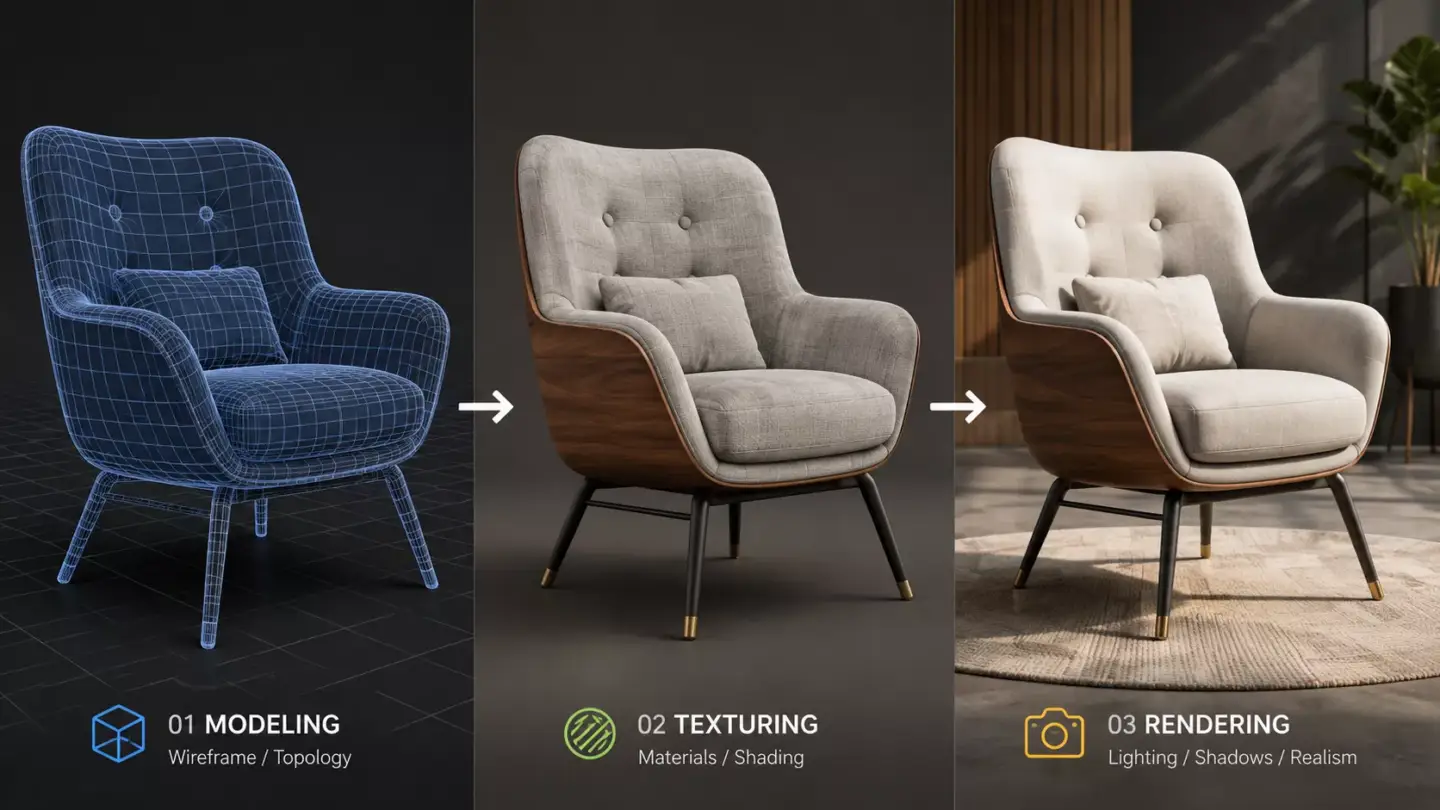
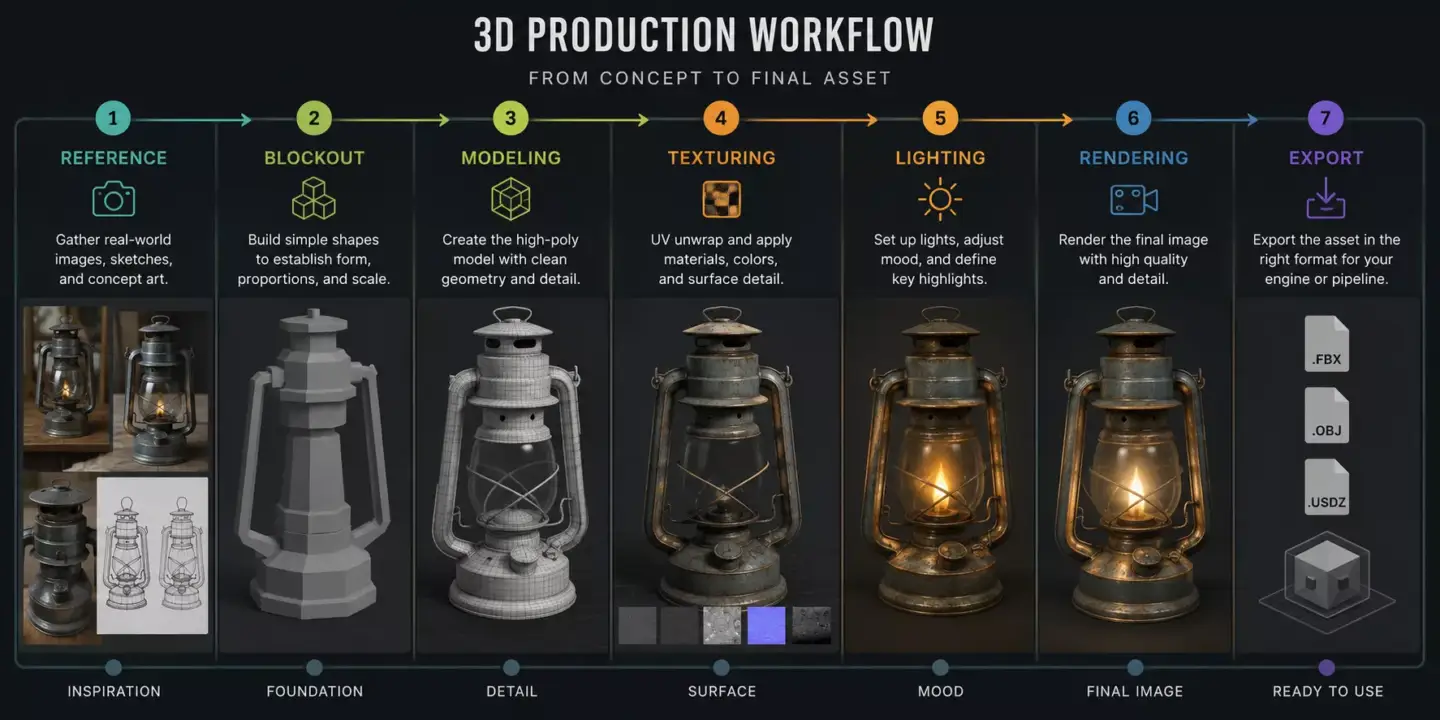
The creator shapes points, edges, polygons, surfaces, or solids inside 3D software until the object has the right form, scale, and level of detail. The model may begin as a simple blockout, then move through refinement, cleanup, texturing, and export.
The workflow usually starts with references, sketches, measurements, scans, or concept art. A product designer may use dimensions and photos, while a game artist may use concept drawings and style references. An architectural team may begin with floor plans, elevations, BIM exports, or site context.
Geometry defines shape, while materials and textures define appearance. Smoothing, subdivision, sculpting, and topology cleanup can improve how the object looks, bends, renders, or exports. Rendering comes later because modeling creates the object, while rendering creates the final image or animation from that object.
Basic Building Blocks of a 3D Model
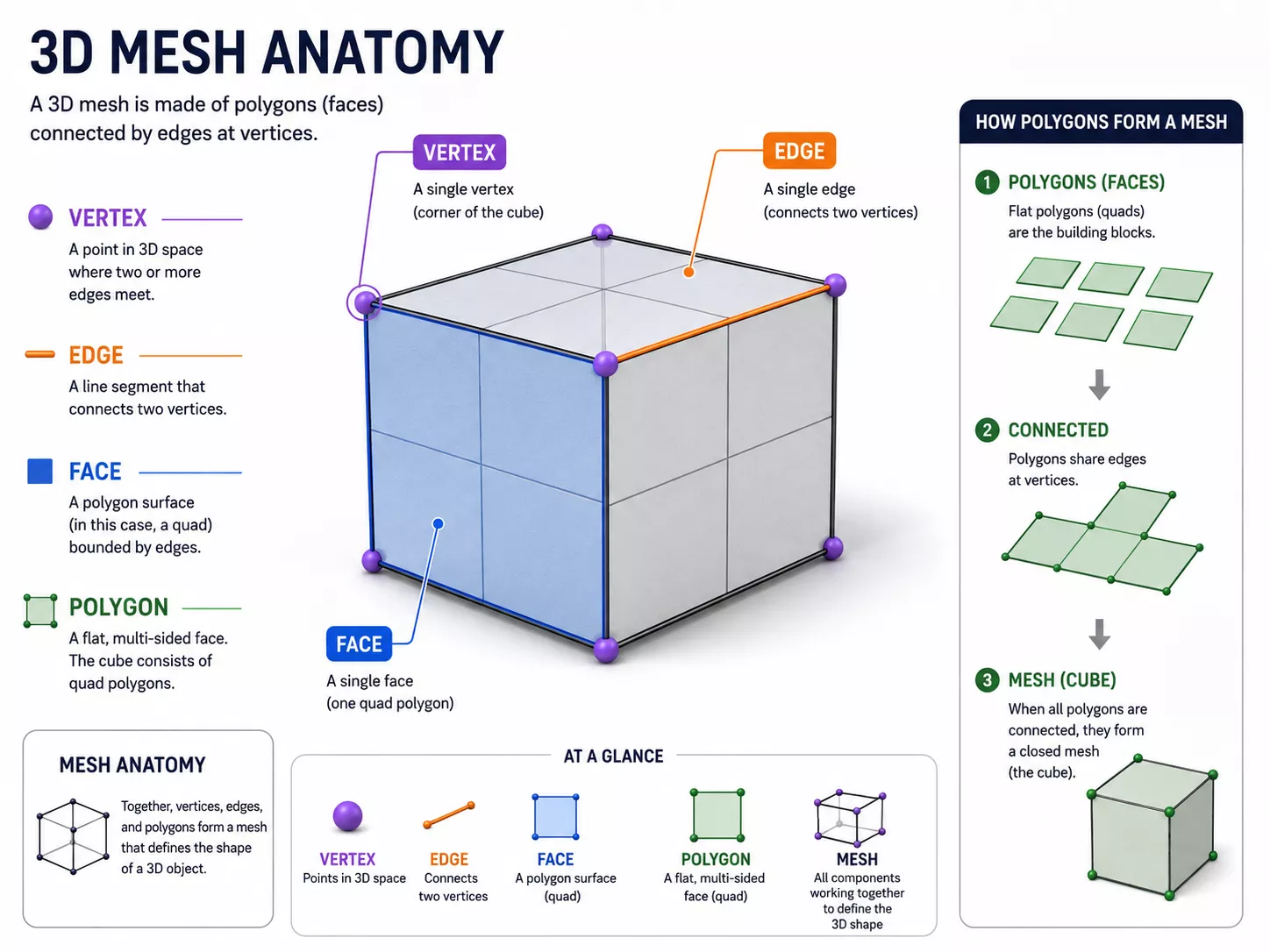
Most models are made from smaller geometric elements that define form. The most common building blocks are vertices, edges, faces, polygons, meshes, textures, and surfaces. Once you understand these terms, the whole 3D modeling process becomes much easier to follow.
| Element | Simple Meaning | Why It Matters |
| Vertex | A point in 3D space | Defines position and shape |
| Edge | A line between vertices | Forms structure |
| Face or Polygon | A flat surface | Creates visible model surfaces |
| Mesh | Connected polygons | Main structure of many models |
| Texture | Image or material data | Adds color, detail, and realism |
A mesh is often the main structure used in entertainment, product visualization, and real-time 3D. Clean topology means the mesh is organized in a way that supports editing, animation, deformation, or optimization. Poor geometry can create shading issues, slow files, and problems when the model moves into rendering or interactive use.
Main Types of 3D Modeling
The main types of 3D modeling include polygonal modeling, solid modeling, surface modeling, sculpting, procedural modeling, and CAD or NURBS modeling. Each type serves a different goal, so there is no single method that fits every project. A character, a chair, a machine part, and a building may all need different modeling logic.
| Type | Best For | Typical Use Case | Beginner Note |
| Polygonal modeling | Flexible visual models | Games, animation, characters, props | Most common for entertainment |
| Solid modeling | Precise physical parts | Engineering, products, manufacturing | Useful when volume and measurements matter |
| Surface modeling | Smooth complex surfaces | Automotive and industrial design | Good for sleek forms |
| Sculpting | Organic shapes | Characters, creatures, collectibles | Similar to digital clay |
| Procedural modeling | Automated variation | Environments, cities, patterns | Rule-based and scalable |
| CAD or NURBS modeling | Technical precision | Architecture, machinery, product design | Measurement-driven |
Different 3D modeling techniques often overlap during production. A product may begin as CAD, be converted into a polygonal asset, then receive UV mapping and textures for visualization. A character may begin as a sculpt, be retopologized into a clean mesh, then prepared for animation.
Polygonal modeling vs solid modeling describes one of the most useful beginner distinctions. Polygonal modeling is often chosen for visual flexibility, while solid modeling is built around measurable volume and technical accuracy. That difference matters when deciding whether a model is mainly for a game asset, a product render, or a manufactured part.
Common Uses for 3D ModelingCommon Uses for 3D Modeling
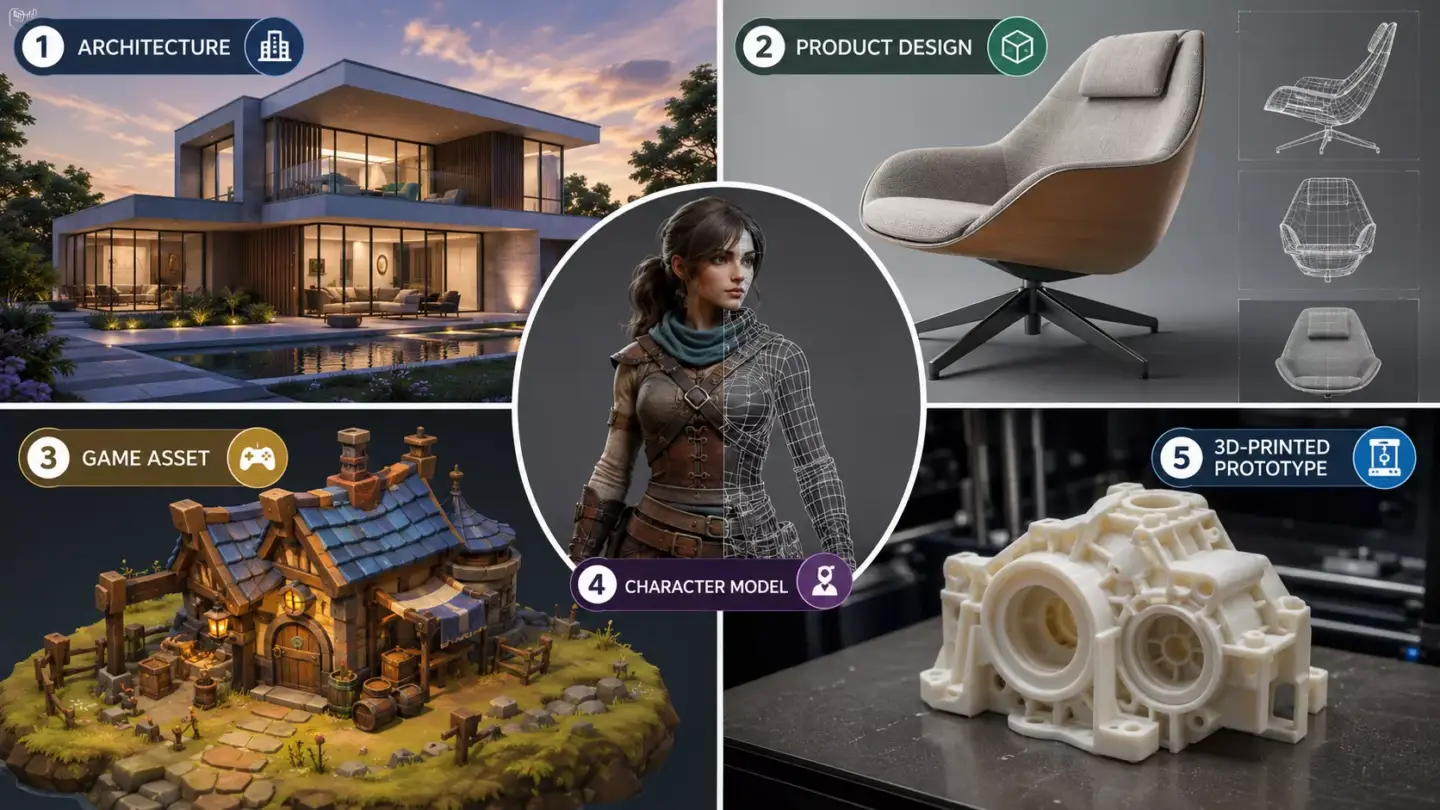
3D modeling helps people design, visualize, test, animate, simulate, sell, and manufacture objects before they exist physically. It gives teams a shared digital asset instead of relying only on imagination, drawings, or rough prototypes. That makes it valuable for creative production and commercial decision-making.
In entertainment, models become characters, props, vehicles, environments, and visual effects assets. In architecture and interior design, they become buildings, rooms, furniture layouts, and walkthrough-ready spaces. Architectural teams often need architectural 3D modeling services when drawings must become structured assets for renderings, animations, panoramas, or marketing visuals.
Product teams use modeling for prototypes, packaging studies, consumer products, and campaign assets. Manufacturing and engineering teams rely on technical models for parts, assemblies, CNC preparation, and 3D printing. eCommerce teams use digital product assets for renders, configurators, AR previews, and reusable product libraries.
Healthcare, science, training, and education also rely on model-based visual explanation. Anatomy models, simulation assets, machine replicas, and digital twins make complex systems easier to study. In AR and VR, models become interactive environments that users can enter, rotate, inspect, or manipulate.
Examples of 3D Modeling in Real Life
Practical 3D modeling examples include a product render for an online store, a game character, an architectural walkthrough, a 3D-printed prototype, a medical anatomy model, and a digital twin of a machine. These examples show that modeling is not one narrow skill. It is a foundation used by many industries that need visual clarity before physical production or public launch.
A furniture brand might create one sofa model, then reuse it with different fabrics and room scenes. A startup might model a device before manufacturing samples, then use the same asset for investor decks and pre-launch marketing. After the model is approved, 3D product rendering services can turn that asset into polished images for eCommerce, ads, presentations, or product pages.
In architecture, a model can help clients understand scale, materials, circulation, and atmosphere before construction begins. In games, the model must often be optimized so it runs smoothly in real time. In 3D printing, the file must be watertight, correctly scaled, and suitable for the chosen material and printer.
The 3D Modeling Process
The 3D modeling process usually moves from purpose and reference gathering to geometry creation, refinement, materials, export, and quality checks. The exact steps change depending on whether the model is for games, product visualization, architecture, CAD, animation, or 3D printing. Still, most professional workflows follow the same broad logic.
- Define the purpose of the model.
- Collect references, dimensions, scans, or drawings.
- Block out the basic shape.
- Build or sculpt detailed geometry.
- Clean topology and optimize the model.
- Add UVs, textures, and materials if needed.
- Render, animate, export, or prepare for 3D printing.
A blockout is a rough version that captures scale and proportions before detailed work begins. This stage helps teams catch design issues early, when changes are still inexpensive. For commercial production, the intended output should be known before modeling starts because a render-ready asset, a game asset, and a printable object need different preparation.
Texture mapping and UV mapping usually come after the main shape is built. UVs tell the software how a 2D texture wraps around a 3D surface, which helps labels, wood grain, fabric, scratches, or color details appear correctly. The final delivery may include file formats such as OBJ, FBX, GLB, STL, USDZ, SKP, or CAD-friendly formats, depending on the use case.
From our studio — When a new artist joins us, even someone with 5 or 10 years in archviz, we start them from the very beginning: build the box, build the scene. The scene matters most. It has to be clean — sorted into layers, no junk, not thousands of stray objects. A lot of seasoned specialists don’t want to bother with this and assume their setup already works fine. Then it gets to render and the problems crawl out. Get the scene and the model clean first; it’s worth learning to do it properly.
— Dim Kuzmenko, Maverick Frame
3D Modeling, Rendering, Printing, and CAD
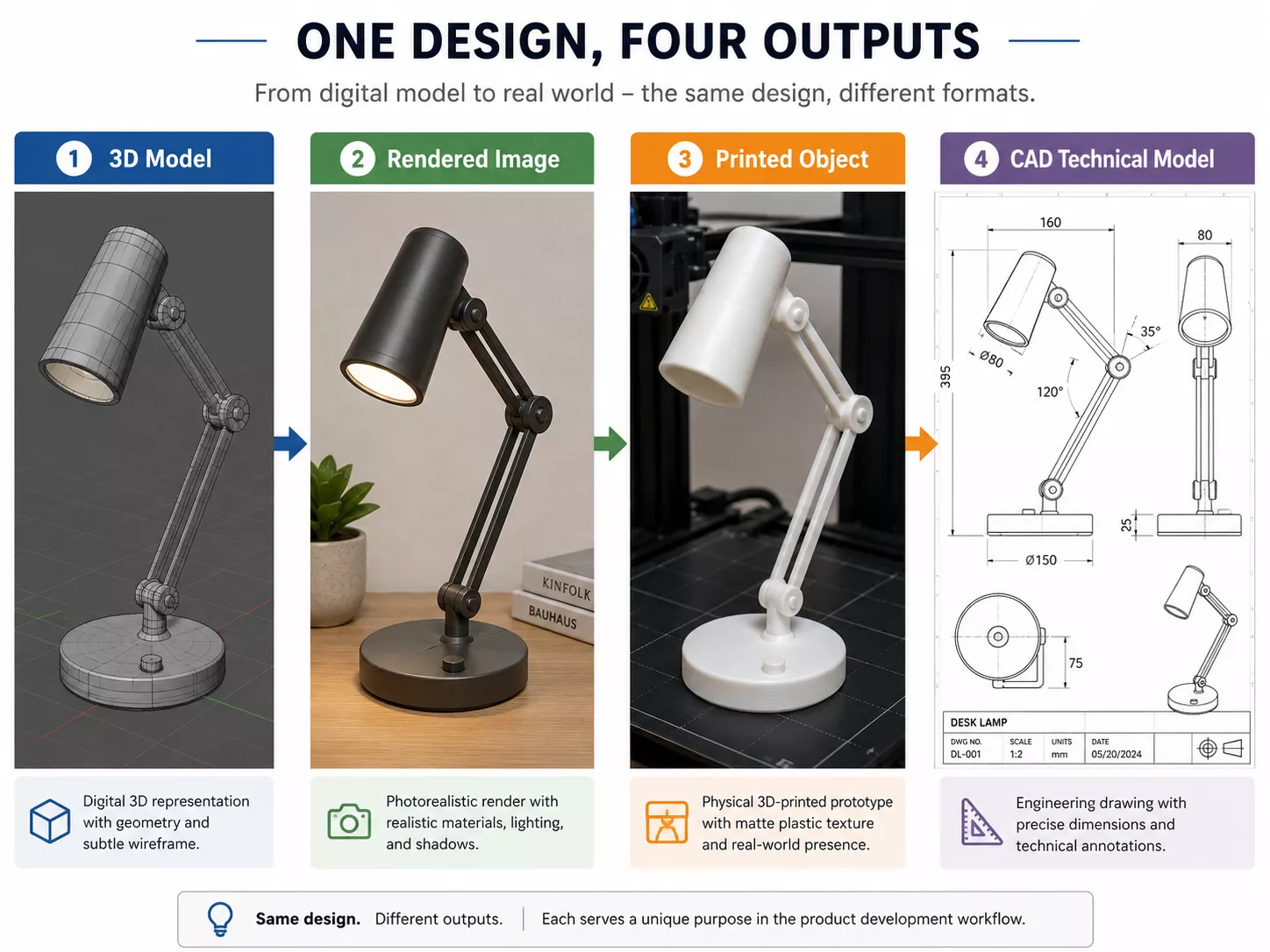
The difference between 3D modeling and rendering is a common source of confusion. Modeling creates the digital object, while rendering turns that object into a still image or animation using camera, lighting, materials, and scene settings. Printing is different again because it turns a suitable digital model into a physical object.
| Term | What It Does | Output |
| 3D modeling | Creates digital geometry | Editable 3D model |
| 3D rendering | Creates a 2D visual from a 3D scene | Image, video, or animation |
| 3D printing | Builds a physical object from a printable file | Physical object |
| CAD | Creates precise technical models | Engineering or product files |
3D modeling vs 3D rendering is best understood as structure compared with visual output. A model can exist without a render, but a realistic render usually needs a model, materials, lighting, and a camera. For motion-based product storytelling, teams may also use 3D product animation services after a clean model is ready.
3D modeling vs. 3D printing is a comparison of digital design and physical production. Not every model is printable because printable files need correct scale, thickness, closed surfaces, and manufacturing-aware cleanup. A beautiful game prop may look complete on screen but fail in a printer if it has holes, floating parts, or unsupported details.
3D modeling vs. CAD contrasts visual modeling with measurement-driven technical design. CAD is often used for engineering, manufacturing, architecture, and product development where precision is central. General 3D modeling is broader because it also includes characters, environments, visual effects, marketing assets, and stylized objects.
Common 3D Modeling Software
Common 3D modeling software includes Blender, Autodesk Maya, 3ds Max, Fusion, SketchUp, Rhino, ZBrush, and Adobe Substance 3D. The best tool depends on the project type, the user’s skill level, and the final output. This section is not a software ranking because the right choice for a character artist may be wrong for an engineer or architect.
| Software | Best For | User Type |
| Blender | General modeling, animation, rendering | Beginners and professionals |
| Maya | Animation, characters, film and game pipelines | Professional artists |
| 3ds Max | Architecture, visualization, game assets | Visualization specialists |
| Fusion | CAD, product design, manufacturing | Engineers and product designers |
| SketchUp | Architecture, interiors, quick concepts | Architects and designers |
| Rhino | NURBS, industrial design, architecture | Technical designers |
| ZBrush | Sculpting, organic models | Character and creature artists |
| Adobe Substance 3D | Materials, texturing, staging | 3D artists and visual teams |
A beginner comparing Blender vs Maya for beginners should focus on goals, cost, and learning support. Blender is often attractive because it is flexible and accessible, while Maya is deeply established in professional animation and character pipelines. The better starting point is the one that matches the user’s target projects and encourages consistent practice.
The term 3D computer graphics covers a wider field than modeling alone. It includes modeling, texturing, lighting, rendering, animation, simulation, compositing, and real-time display. Modeling is the foundation, but finished commercial visuals depend on several connected disciplines.
Learning Difficulty for BeginnersFrom our studio — For archviz, the vast majority of our work is in 3ds Max because we are simply much faster in it. The only exception is certain projects in D5 Render, where we will model in SketchUp instead. But SketchUp only for D5; otherwise it is 3ds Max.
— Dim Kuzmenko, Maverick Frame
Learning Difficulty for Beginners
The 3D modeling learning experience is balanced. Basic modeling is manageable for beginners, especially when they start with simple objects and one tool. Professional production takes longer because it requires accuracy, clean topology, good judgment, file organization, and knowledge of the model’s final use.
The hardest parts are not always the buttons in the software. Beginners often struggle with scale, proportions, topology, texture mapping, lighting, optimization, and knowing when a model is finished enough. Those skills improve faster when projects are small, specific, and tied to a clear output.
Good starter projects include simple props, furniture, low-poly objects, packaging mockups, and basic product shapes. Characters, vehicles, and complex interiors are better after the fundamentals feel comfortable. A clear path is interface, navigation, primitives, transforms, modeling tools, materials, and then rendering or export.
How Beginners Can StartHow Beginners Can Start
To get started with 3D modeling, choose a beginner-friendly tool and learn to navigate it by building small objects. Only attempt complex scenes later. Switching software too early can slow progress because every interface has its own logic. Early consistency matters more than chasing advanced features.
Start by learning how to move around the viewport, select objects, adjust scale, move parts, rotate shapes, and apply basic transforms. Then build objects from primitives such as cubes, cylinders, spheres, and planes. As skills improve, practice naming objects, organizing files, keeping geometry clean, and exporting for a real purpose.
Beginners should learn materials only after they can control their shape. Materials make a model look better, but they cannot fix weak proportions or messy geometry. Once the model is solid, basic lighting and rendering help the creator evaluate how the object will look in presentation or marketing contexts.
When Businesses Should Use 3D ModelingWhen Businesses Should Use 3D Modeling
A business should use 3D modeling when a product, space, asset, or concept needs to be visualized, tested, customized, rendered, animated, or manufactured before it is physically produced. This is especially useful when photography is impossible, prototypes are expensive, or stakeholders need clarity early. It also helps marketing teams create launch assets before final production is complete.
In product marketing, a digital 3D object can become the source asset for images, animation, configurators, AR previews, and product pages. That makes modeling valuable beyond a single campaign because one clean model can support multiple channels. For online stores, 3D rendering for eCommerce can help teams present products from useful angles before or alongside traditional photography.
Architecture, real estate, and interior design teams use modeling to explain spaces before they are built. A clean architectural model can support still images, walkthroughs, sales presentations, and approval materials. When motion helps explain flow and atmosphere, 3D architectural animation services can turn the modeled space into a guided visual story.
| Option | Best When | Limitation |
| In-house modeling | Ongoing 3D needs and pipeline control | Requires hiring, software, and training |
| Freelancer | Small or one-off assets | Quality and consistency may vary |
| 3D studio | Complex, scalable commercial projects | Higher cost, but stronger process |
| AI-assisted tools | Fast concepts and early ideation | May need cleanup for production use |
The choice depends on volume, quality requirements, deadlines, and how often the business will reuse 3D assets. In-house teams fit ongoing pipelines, while freelancers can work for smaller isolated needs. A specialized studio is often better when the asset must support modeling, rendering, animation, stakeholder review, and commercial delivery.
Production Terms Beginners Should KnowProduction Terms Beginners Should Know
A mesh is a connected structure of polygons that defines a model’s shape. Vertices are points, edges are lines between points, and polygons are flat surfaces formed by edges. Together, they make the object editable inside 3D software.
Topology describes how the surface is organized. Clean topology matters when a model needs to deform, animate, subdivide, or render without strange shading artifacts. It also helps other team members edit the file without rebuilding the asset from scratch.
UV mapping and texture mapping help 2D image details wrap correctly onto 3D surfaces. Materials describe how a surface reacts to light, such as metal, plastic, glass, fabric, or wood. Textures can add color, roughness, normal detail, labels, wear, or small imperfections without modeling every detail by hand.
Modeling accuracy decides everything downstream, as in these 3D product visuals for a suitcase brand and this robotic arm 3D rendering.

Turn Ideas Into Visual Stories
Free field guide
What You Actually Own When You Buy a Model
The file formats, the difference between a picture and an asset, and the eight questions that decide whether you can use your model again next year.
If it didn't open, download it here.
Download the PDF