Corona vs V-Ray: Which Render Engine Is Better for Architectural Visualization?
Discover High-Quality CGI Services Tailored to Your Business
- Why Corona vs V-Ray Still Matters in 2026
- Corona vs V-Ray: Rendering Quality and Realism
- Lighting and Global Illumination Comparison
- Material and Reflection Handling
- Interior vs Exterior Quality Cases
- Corona vs V-Ray Speed and Performance
- CPU vs GPU Rendering Explained
- Render Time in Simple vs Complex Scenes
- Noise, Denoising and Time to Clean Image
- How Corona and V-Ray Fit Into Daily ArchViz Workflows
- 3ds Max Workflow Comparison
- Iterations, Client Feedback and Revisions
- Integration With Plugins and Assets
- Practical Use Cases: When to Choose Corona or V-Ray
- Best for Interiors and Quick Turnarounds
- Best for Complex Exteriors and Detailed Control
- Animation, Post-Production and Advanced Pipelines
- Pros and Cons: Real Studio-Tested Insights
- How to Decide: A Simple Framework for Your Project
- Final Verdict
When it comes to architectural visualization, the render engine you choose can make or break the quality and efficiency of your projects. As professionals try to improve their designs, the debate between Corona vs V-Ray is still a hot topic. This comprehensive Corona vs V-Ray comparison aims to explore the strengths and weaknesses of each engine, ultimately addressing the question: V-Ray vs Corona, which is better? We’ll be talking about things like Corona vs V-Ray speed, rendering quality, and the intricacies of CPU vs GPU rendering performance. By taking a look at how they perform in 3ds Max, along with some insights on global illumination comparison and architectural visualization workflow efficiencies, this article will help you make an informed decision about the best ArchViz render engine for your specific needs.
Why Corona vs V-Ray Still Matters in 2026Why Corona vs V-Ray Still Matters in 2026
Since 3D architectural rendering services continue to evolve, the debate between Corona vs V-Ray remains critically important for studios and visualizers. Architects, visualizers, and studios are still comparing these two top ArchViz render engine options. They’re checking out their tech skills and how they fit into the architectural visualization workflow of the industry. It’s important for professionals to understand these differences so they can make informed decisions that can have a big impact on their projects and business outcomes.
Whether you’re selling off-plan properties in Dubai or launching a luxury furniture line, your renders must be effective. That’s why the Corona vs V-Ray debate is important. The right rendering engine affects more than just render time. It also affects client trust, campaign performance, and ROI. In CGI for real estate marketing, for example, speed and emotional realism are non-negotiable. Corona’s natural lighting might win there. However, in CGI for product launches, V-Ray’s material precision is essential for conveying craftsmanship.
Changing Workflows in ArchVizChanging Workflows in ArchViz
The field of architectural visualization has been changing a lot recently because of new technology and shifting client expectations. As teams start working together more and projects need to be finished faster, the choice of ArchViz render engine can really impact how efficiently the architectural visualization workflow goes.
– Integration with Software: Corona Renderer and V-Ray work with popular 3D modeling tools like SketchUp, 3ds Max, and Revit. This helps visualization teams streamline their processes. But as workflows start using more real-time rendering and virtual reality, each engine’s ability to adapt becomes really significant.
– Team Collaboration: With so many teams working remotely these days, it’s more important than ever to have good collaboration tools. V-Ray has made a big name for itself with its strong features, which are great for large-scale commercial projects. Corona Renderer gets a lot of praise for its easy-to-use interface, which makes it simple for team members with different levels of technical expertise to work together.
And if you’re using ArchViz to support go-to-market plans, explore how 3D Rendering for Marketing reveals the direct link between render quality and sales lift.
Simplicity vs ControlSimplicity vs Control
There’s always been some tension between Corona vs V-Ray when it comes to finding the right balance between simplicity and control.
– User-Friendly Interface: Corona Renderer is known for its user-friendly design, making it accessible for artists who may not have extensive technical backgrounds. This simplicity makes it easy to learn and use, which is great for boutique firms and freelancers, especially in fast-turnaround architectural visualization workflow scenarios.
– Advanced Features and Control: V-Ray, on the other hand, has more advanced features that appeal to users who need more control over the rendering parameters. It’s got a ton of options that let even seasoned artists tweak every part of the rendering process to get results that are totally customizable. This level of control is really important for high-stakes projects where precision is key.
Speed vs QualitySpeed vs Quality
When it comes to rendering, the choice of engine depends a lot on whether you’re looking for speed or quality.
– Efficiency in Rendering: With tight deadlines, the speed of rendering is super relevant. Corona Renderer is great at producing high-quality images quickly, which is good for iterative processes and dealing with frequent client feedback.
– Quality Standards: But V-Ray really shines when it comes to delivering top-notch quality with its cutting-edge rendering techniques and support for complex materials. For high-end projects that need to look super real, V-Ray might be the go-to, even if it takes a bit longer to render. The decision depends on the studio’s goals, deadlines, and what the client expects.
Hardware ImpactsHardware Impacts
The performance of rendering engines can be heavily influenced by the hardware capabilities available to the end-user, especially when analyzing CPU vs GPU rendering performance.
– Hardware Requirements: V-Ray, with its advanced rendering capabilities, often requires more powerful hardware to fully utilize its features, particularly for complex scenes and high-resolution outputs. On the other hand, Corona Renderer is praised for its ability to perform well even on mid-range systems, which makes it more accessible for studios with tighter budgets.
– Future-Proofing Investments: As hardware technology keeps getting better, it’s important to understand how a rendering engine’s performance on different machines can affect a business’s long-term strategy. Companies need to think about current hardware and future upgrades that could align with their chosen ArchViz render engine.
As you can see, the ongoing discussion between Corona vs V-Ray shows the different needs and challenges that architects and visualizers are facing, especially in ArchViz. As architectural visualization workflow changes, it’s important to understand the differences between these rendering engines so you can make informed decisions aligned with architectural visualization services and business goals. By thinking about things like how simple something is versus how much control it gives you, how fast it is versus how good it is, and how hardware affects it, professionals can choose the engine that not only works for them right now but also supports their long-term success in an industry that’s always changing.
Corona vs V-Ray: Rendering Quality and Realism
Architectural visualization is all about making it look real. Both Corona Renderer and V-Ray have become popular choices among artists and studios, but they have different approaches to rendering quality. This section looks at the main parts of rendering, like lighting, material handling, and how performance differs for interior and exterior cases.
Lighting and Global Illumination ComparisonLighting and Global Illumination Comparison
Lighting is arguably one of the most important parts of rendering quality, since it has a big effect on how you see a scene. Corona Renderer and V-Ray both use sophisticated global illumination (GI) techniques, but they’re a bit different in what they’re good at.
– Corona Renderer: Its intuitive handling of natural light is well-known, and Corona is great at simulating soft shadows and realistic lighting scenarios with minimal configuration. The engine uses a physical sky model that lets users create stunning outdoor scenes with different lighting conditions, making it easy to feel the time of day and see the effects of the atmosphere. The simple setup means that even novice users can generate visually stunning results without deep technical expertise.
– V-Ray: Though V-Ray also has advanced lighting capabilities, it gives more control to experienced users. With a bunch of options for global illumination, like Brute Force and Irradiance Map, V-Ray lets artists pick the best approach for their project. This flexibility can lead to stunningly realistic renders, especially in complex indoor environments where custom lighting setups are crucial to achieve dramatic effects.
Material and Reflection HandlingMaterial and Reflection Handling
The quality of materials and how they reflect light is another important thing that Corona Renderer and V-Ray do differently.
– Corona Renderer: You’ll find Corona’s material editor to be straightforward and user-friendly, allowing for quick adjustment of textures, colors, and reflections. A lot of users are impressed by the realistic materials in Corona Renderer that are ready to go right out of the box. This is perfect for anyone looking to improve their architectural visualization workflow without sacrificing quality. It’s a piece of cake to create realistic materials, and they can really boost your productivity, especially on those hectic projects.
– V-Ray: With V-Ray, you can customize materials with unparalleled detail, making it perfect for projects where precision is key. Artists can adjust different settings to make materials that look like glass, metal, and fabric. They can control things like how bumpy or glossy something looks, and how deep the reflection is. This level of detail lets V-Ray produce stunning, photorealistic outputs, especially in projects that need accuracy, like product visualizations and high-end architectural renders.
Interior vs Exterior Quality CasesInterior vs Exterior Quality Cases
Corona Renderer and V-Ray can perform very differently depending on whether the project focuses on interior or exterior visualization.
– Interior Quality Cases: In indoor spaces, users often like how easy it is to use and how well it handles natural light. The Corona Renderer engine’s ability to produce beautiful, soft light and shadows makes it popular among interior designers, creating inviting and cozy spaces. It’s really efficient, so you can make changes to your designs faster, which is key when you’re listening to your clients and making adjustments. But when you’re working on complex lighting scenes that need a lot of control, V-Ray’s advanced features really shine. It’s super easy to highlight specific design elements and get a high level of realism.
– Exterior Quality Cases: When it comes to exterior renders, V-Ray’s got you covered with its wide range of control and flexibility. It can handle all sorts of tricky lighting situations, like harsh sunlight and all kinds of weather effects, so artists can create outdoor scenes that are both dramatic and engaging. The precision in adjusting light paths and reflections ensures that external materials like glass and stone render accurately in varied lighting conditions. On the other hand, Corona also performs really well in outdoor scenarios, especially when users are looking for beautiful, expansive landscapes with a focus on the natural environment. It’s quick to set up and handles sunlight well, making it great for creating outdoor scenes quickly.
Comparing Corona Renderer and V-Ray in terms of rendering quality and realism really highlights the strengths of each engine. If you’re looking for something easy to use and that’ll get the job done quickly, Corona Renderer is a great option, especially for places where there’s a lot of natural light and you want something simple. On the other hand, V-Ray’s flexibility and level of control make it the go-to solution for projects that need complex material handling and exact lighting configurations. Knowing the differences lets architects and visualizers choose the right tool for the job, which improves the quality of their work in the competitive world of architectural visualization.
Corona vs V-Ray Speed and Performance
When you’re checking out rendering engines, it’s key to look at how fast and well they perform. This can make or break how smoothly your architectural visualization workflows run. But it’s important to remember that how fast your designs render isn’t just about the capabilities of your hardware. It’s also a lot about the way you work.
CPU vs GPU Rendering ExplainedCPU vs GPU Rendering Explained
Both Corona Renderer and V-Ray have embraced advances in hardware technology, incorporating support for Graphics Processing Unit (GPU) rendering to significantly enhance performance. If you understand how these engines are built, you can make smart choices about which tool is best for your hardware and project.
– Corona Renderer: It’s mostly a Central Processing Unit (CPU)-based renderer, but it’s got some GPU support now. This lets users take advantage of modern graphics cards, which can speed up render times for some tasks. But even with its GPU capabilities, Corona Renderer stays focused on simplicity and ease of use, making it a great choice for those who want to get results quickly without having to deal with complex settings.
– V-Ray: You can use V-Ray’s advanced GPU rendering capabilities to switch between CPU and GPU based on your project’s needs. This flexibility lets artists take advantage of the extra processing power of GPUs, which often makes the rendering process much faster. It’s great for complicated scenes because it can save a lot of time, which is why a lot of people like using V-Ray for high-performance jobs.
Render Time in Simple vs Complex ScenesRender Time in Simple vs Complex Scenes
How complex a scene is has a big impact on rendering speed, and both Corona Renderer and V-Ray are good at different things when it comes to this.
– Simple Scenes: For basic projects, both engines give you fast rendering times, but Corona’s simple setup often means you can get going faster. It’s user-friendly, so even beginners can quickly get great results without getting bogged down in technical details.
– Complex Scenes: When working with complex scenes that have a lot of high-resolution textures, different light sources, and detailed geometry, the speed and performance differences are more noticeable. V-Ray usually performs better in these situations because it has a bunch of optimization options and advanced algorithms that handle resources efficiently. Artists can adjust settings to speed up rendering without losing quality, which is a huge help in projects where time is of the essence.
Noise, Denoising and Time to Clean ImageNoise, Denoising and Time to Clean Image
To get a final image that’s clean and noise-free, you’ve got to understand how each engine handles noise and denoising processes.
– Noise Handling: Both Corona Renderer and V-Ray use advanced sampling techniques to reduce noise in renders, but they do it in different ways. Corona is great at reducing noise, and it can get clean images, especially in well-lit scenes, pretty quickly. This means users can often get good renders quickly, even with just a few tweaks.
– Denoising Features: V-Ray’s got some great tools for denoising, especially for more complex or higher-resolution projects. Its dedicated tool can really cut down on the time it takes to get a clean output, especially when users go for GPU rendering. This feature lets artists submit images for client review faster without losing quality.
In practice, Corona Renderer can sometimes make initial renders faster, but V-Ray’s advanced noise handling through denoising can sometimes lead to better quality outputs in complex situations. This means artists need to consider both engines’ strengths based on their project needs.
How Corona and V-Ray Fit Into Daily ArchViz Workflows
Picking the right rendering engine for architectural visualization is about more than just the features. It has a big impact on the day-to-day workflows in studios and for freelancers. It’s important to understand how Corona Renderer and V-Ray fit into typical processes so you can make informed decisions that’ll boost your productivity and efficiency. For large-scale off-plan projects, 3D visualization for real estate developers depends on stable workflows, predictable render performance, and the ability to iterate efficiently across multiple units and stakeholder reviews. Let’s take a look at how these engines work in the day-to-day of 3ds Max, from setting them up to getting feedback from clients and how they work with other tools.
3ds Max Workflow Comparison3ds Max Workflow Comparison
Both Corona Renderer and V-Ray are designed to work perfectly with 3ds Max, a top software for architectural visualization. Before rendering begins, high-quality geometry and scene preparation through 3D modeling services play a critical role in ensuring stable workflows, clean materials, and predictable render performance in both engines. But they can have different approaches to architectural visualization workflow.
– Corona Renderer: Its intuitive setup lets you quickly and easily configure scenes. The engine’s simple material editor and lighting tools make it a breeze to get a realistic look. Artists can set up scenes quickly, use natural lighting, and do test renders way faster than with more complex engines. This makes it especially useful for freelancers and smaller studios that might not have a lot of technical resources.
– V-Ray: While V-Ray requires more initial configuration than Corona, it offers more extensive control, which can be useful for more complex projects. You can fine-tune lighting settings and materials with great precision, but this may extend initial setup times. V-Ray’s got some pretty cool features, like Interactive Production Rendering (IPR), that let you see real-time changes, which can speed up the testing phase a lot for the more experienced users.
Iterations, Client Feedback and RevisionsIterations, Client Feedback and Revisions
As any ArchViz professional knows, client feedback and revisions are a big part of the architectural visualization workflow. The performance of each rendering engine during this iterative process can have a big impact on project timelines.
– Corona Renderer: It’s great for projects that need a lot of quick iterations because it renders so quickly and has a user-friendly interface. Artists can quickly tweak designs based on client feedback and knock out new renders in no time. This efficiency is key to keeping clients happy and making sure projects are delivered on time.
– V-Ray: On the other hand, V-Ray is great when you need to make detailed changes. It’s got a bunch of features that let artists make more detailed changes, which might take a bit more time at first. But, the level of customization is so high that once the revisions are finished, the final product can be absolutely amazing. For studios handling big projects or clients with high standards, V-Ray’s ability to handle complex scenes and produce stunning photorealism justifies the time invested in iterations.
Integration With Plugins and AssetsIntegration With Plugins and Assets
Another big thing to think about when choosing between Corona Renderer and V-Ray is how each engine works with other plugins and assets. This can really improve ArchViz workflows.
– Corona Renderer: There are a bunch of third-party plugins out there designed to make it easier to use and streamline processes. A lot of users love how well it works with popular asset libraries, giving them access to materials, textures, and models. This makes it super easy to develop a scene quickly. The Corona interface is simple, so these plugins can be used without a lot of technical knowledge, which makes them accessible to more people.
– V-Ray: One of the best things about V-Ray is that it works with lots of other tools and applications. It works great with other asset management plugins, like V-Ray Material Library, so you can keep track of your materials no matter how complex they are. For studios that use a lot of different assets, V-Ray’s strong ecosystem helps with optimization and workflow efficiency, but it does require a steeper learning curve.
Practical Use Cases: When to Choose Corona or V-Ray
When it comes to architectural visualization, the choice between Corona Renderer and V-Ray can make or break a project. Both of these rendering engines have their own strengths that are a good fit for different types of projects and different users. If you understand how they’re used in the real world, you can make smart decisions about which engine is best for each project.
Best for Interiors and Quick TurnaroundsBest for Interiors and Quick Turnarounds
When it comes to creating stunning interior visualizations, Corona Renderer is a top choice for professionals in the architectural visualization field. It’s got a simple interface and makes workflows efficient, so artists can focus on the creative parts of their projects instead of getting bogged down by complicated settings. This focus on usability helps designers quickly come up with ideas and bring them to life, making Corona a great choice for both residential and commercial interiors.
And for freelancers or small studios with a lot on their plate and tight deadlines, Corona’s rapid rendering capabilities can really boost productivity. The engine’s efficiency lets designers make quick changes and improvements, making sure they meet their clients’ expectations without sacrificing quality. For example, studies show that teams using Corona can reduce render times by up to 50%, which is great for making faster revisions that are really valuable during presentations and pitches. This speed is a huge asset in the fast-paced world of ArchViz, where quick feedback cycles are the norm.
Corona Renderer is the best option for interior visualizations because it’s user-friendly, fast, and high-quality. It’s perfect for projects where quick turnarounds are crucial. Plus, it makes the creative process better and helps keep things moving quickly in the office.
Best for Complex Exteriors and Detailed ControlBest for Complex Exteriors and Detailed Control
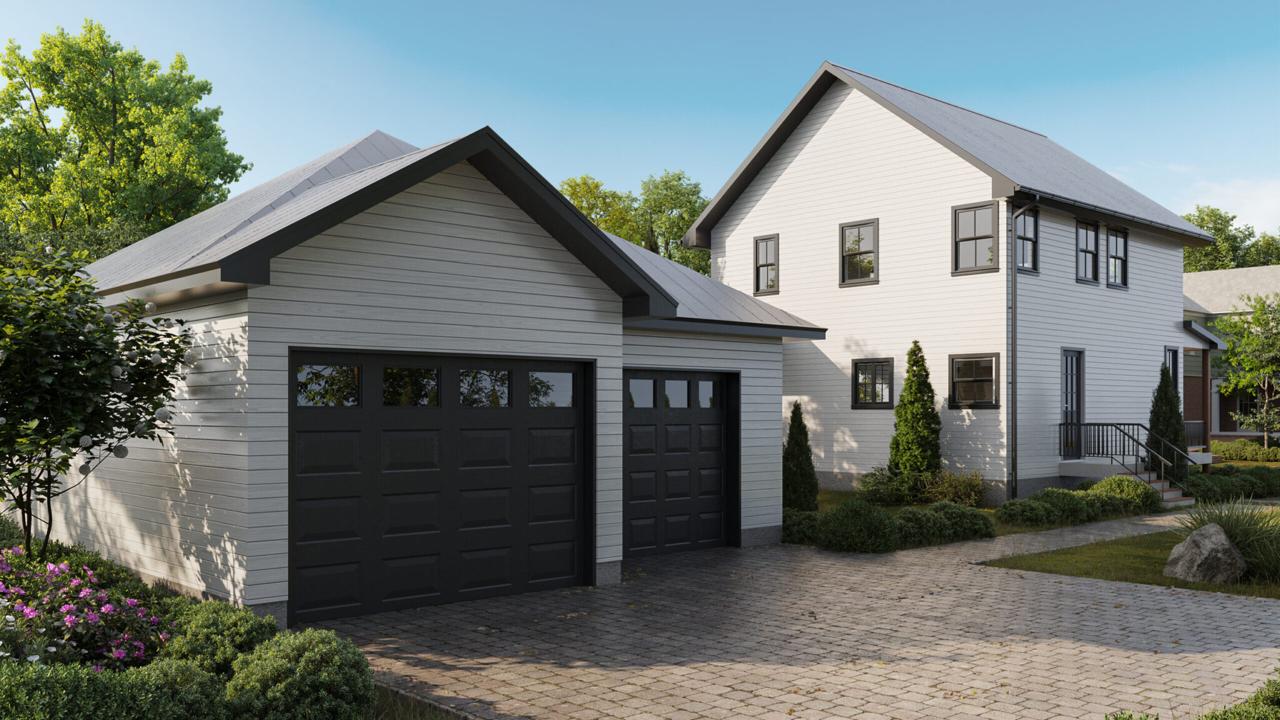
If you’re in the architectural visualization game and working on complex designs or big projects, V-Ray is the go-to rendering engine. It’s got all the bells and whistles you could want, and it’s super powerful. This engine is great at handling the complexities of exterior visualizations, where the little details like light, texture, and detail are key to getting the final design just right.
One of the best things about V-Ray is its strong material editor, which lets artists precisely adjust materials for a super realistic result. This level of precision is key, especially in complex exterior projects, where every detail of textures, lighting, reflections, and environmental interactions has to be nailed. For example, a recent case study showed that using V-Ray’s material editor helped a team improve their render quality a lot. They achieved a 30% increase in realism, as rated by client feedback, compared to previous projects rendered with simpler tools.
V-Ray’s got all the tools and features you need to make complex exterior visualizations look amazing and make the creative process easier. It’s a must-have for architects and designers who want to impress clients and deliver top-notch work.
Animation, Post-Production and Advanced PipelinesAnimation, Post-Production and Advanced Pipelines
When it comes to animation projects, architectural animation services often rely on V-Ray for its advanced rendering capabilities, ensuring consistent lighting, material accuracy, and high-quality outputs across complex sequences. It’s got some pretty advanced rendering features that are designed to support complex animations while ensuring high-quality outputs. This feature is key for creating architectural walkthroughs and promotional materials that need detailed movements, realistic lighting, and textures that make a project pop.
One of the cool things about V-Ray is that it can keep the frame rate consistent throughout an animation. This feature makes sure that the materials and lighting stay the same across all frames, which is key to avoiding distracting differences that can mess up the immersive experience for viewers. For example, a studio that used V-Ray in their animations said they got about 25% fewer client revisions because the animations looked really smooth and consistent over long sequences. This consistency makes the final product look more professional and trustworthy, which is important for building trust with clients who expect quality and reliability.
V-Ray’s strengths go beyond animation into post-production workflows, making it a powerful tool for artists aiming for polished results. It works seamlessly with industry-standard software like Adobe After Effects and Nuke, so you can do advanced compositing and refine rendered images. This feature is key for any artist looking to add a touch of class to their projects with extra effects and tweaks in the final product.
On top of that, V-Ray offers a lot of flexibility thanks to its ability to render beauty passes and other compositional elements separately. This advanced compositing technique is key when projects need to be tweaked based on client feedback. For example, by isolating elements like shadows, reflections, and foliage, artists can make targeted adjustments after rendering, which helps them achieve versatile results that meet client expectations without needing to re-render entire scenes. This streamlined process saves time and boosts creativity, letting teams explore different visual options without losing productivity.
Pros and Cons: Real Studio-Tested InsightsPros and Cons: Real Studio-Tested Insights
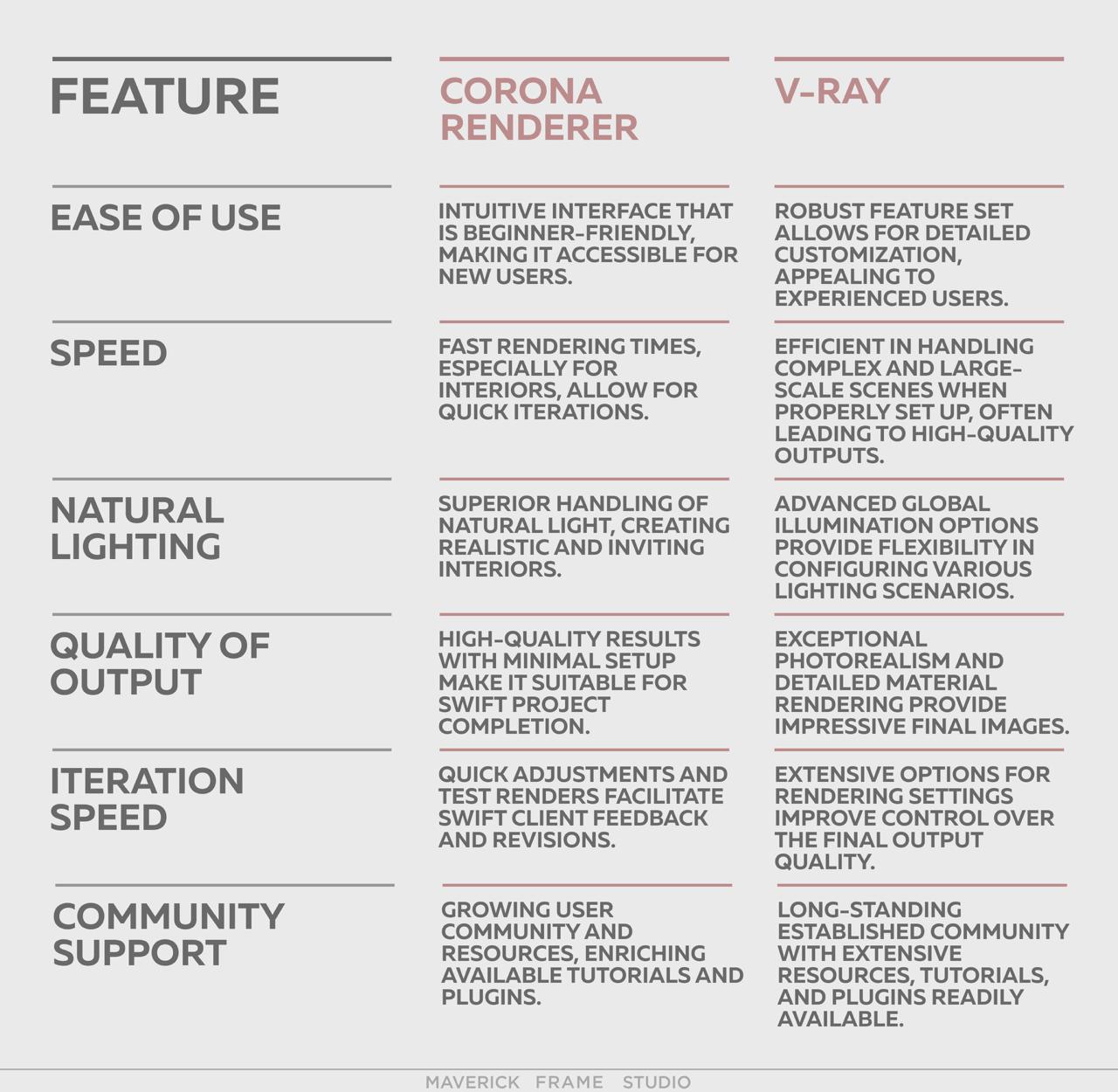
Pros of Corona Renderer and V-RayBased on real studio workflows, this comparison highlights how Corona Renderer and V-Ray perform in everyday architectural visualization projects, focusing on usability, performance, and output quality.
Pros of Corona Renderer and V-Ray
Both render engines offer distinct advantages depending on project type, team experience, and production goals.
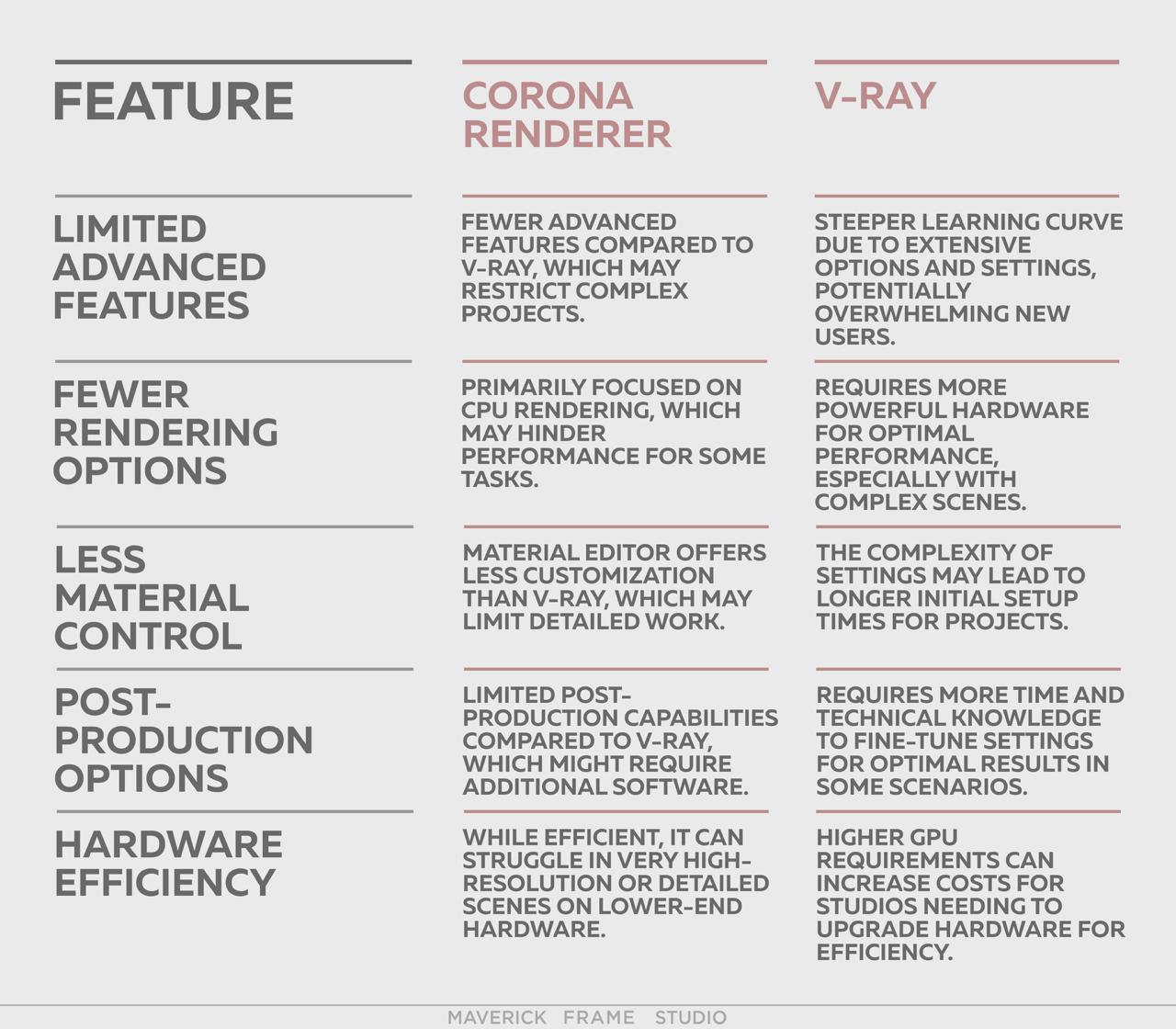
Cons of Corona Renderer and V-Ray
Despite their strengths, each engine has limitations that can impact efficiency, learning curve, and hardware requirements in professional environments.
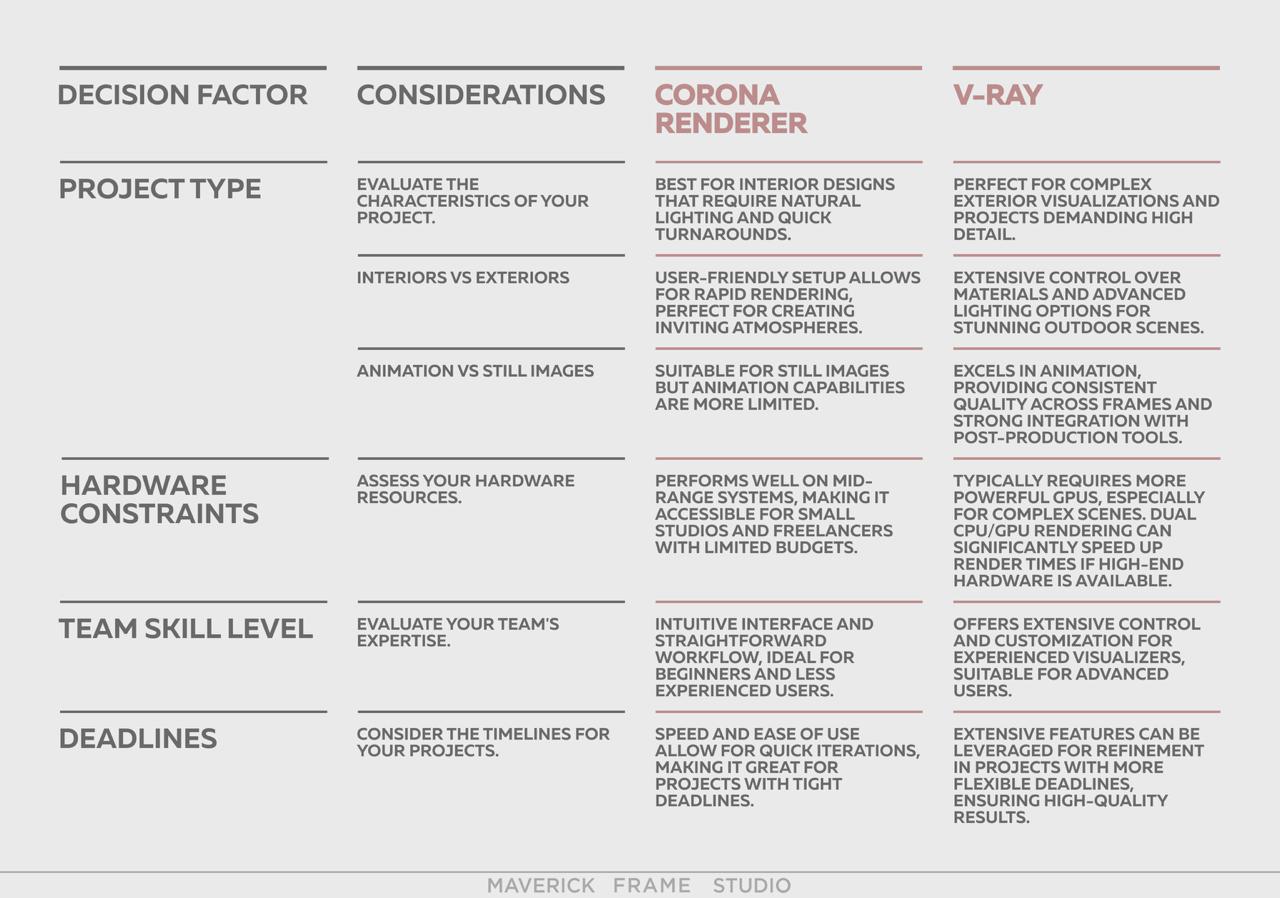
How to Decide: A Simple Framework for Your Project
Choosing between Corona and V-Ray depends on factors such as project scale, deadline pressure, animation needs, hardware setup, and the level of control required during production.
Final Verdict
In the debate between Corona Renderer and V-Ray, it’s key to understand the unique strengths of each engine to achieve success in architectural visualization. Corona is great at fast production and interior design, so it’s perfect for projects with tight deadlines or those that focus on natural light and ambiance. On the other hand, V-Ray is the better choice for complex projects that need a lot of intricate details and precise control, especially for high-end exterior visualizations and animations.
The best approach might be to use both engines to make the most of the flexibility and efficiency. With Corona Renderer for quick turnarounds and V-Ray for its advanced capabilities, teams can handle all kinds of projects and skill levels. This strategy improves the quality of the final output and streamlines the architectural visualization workflow, empowering creative visions and boosting productivity across all architectural visualization projects.
SHARE THIS...
Get High-Quality CGI for Your Business Purposes
Book a call to get started
Our other articles
Elevate Your Business with Stunning CGI
Start working on your next project as soon as tomorrow. Book a call with our team and discuss the key details:
- Learn how we achieve photorealistic quality in our visualizations and animations. Explore our award-winning projects, featured multiple times on Behance.
- Get to know our company structure and decide which services you need
- Tell us about your project and let us complete a free test task to demonstrate our approach
- Find out the exact cost of bringing your project to life